Back to Templates


Community Node Disclaimer
This workflow uses KlickTipp community nodes, available for self-hosted n8n instances only.
Who’s it for
Sales and marketing teams using Pipedrive (Persons) and KlickTipp who want a reliable two-way sync for:
- Contact profiles (name, email, phone, birthday)
- Consent/marketing status (subscribed / no consent / unsubscribed)
- Segmentation (KlickTipp Tags ↔ Pipedrive Labels)
This workflow is ideal if you want to avoid CSV imports, prevent manual updates, and ensure that changes in either platform are reflected in the other — including deletes and consent changes.
How it works
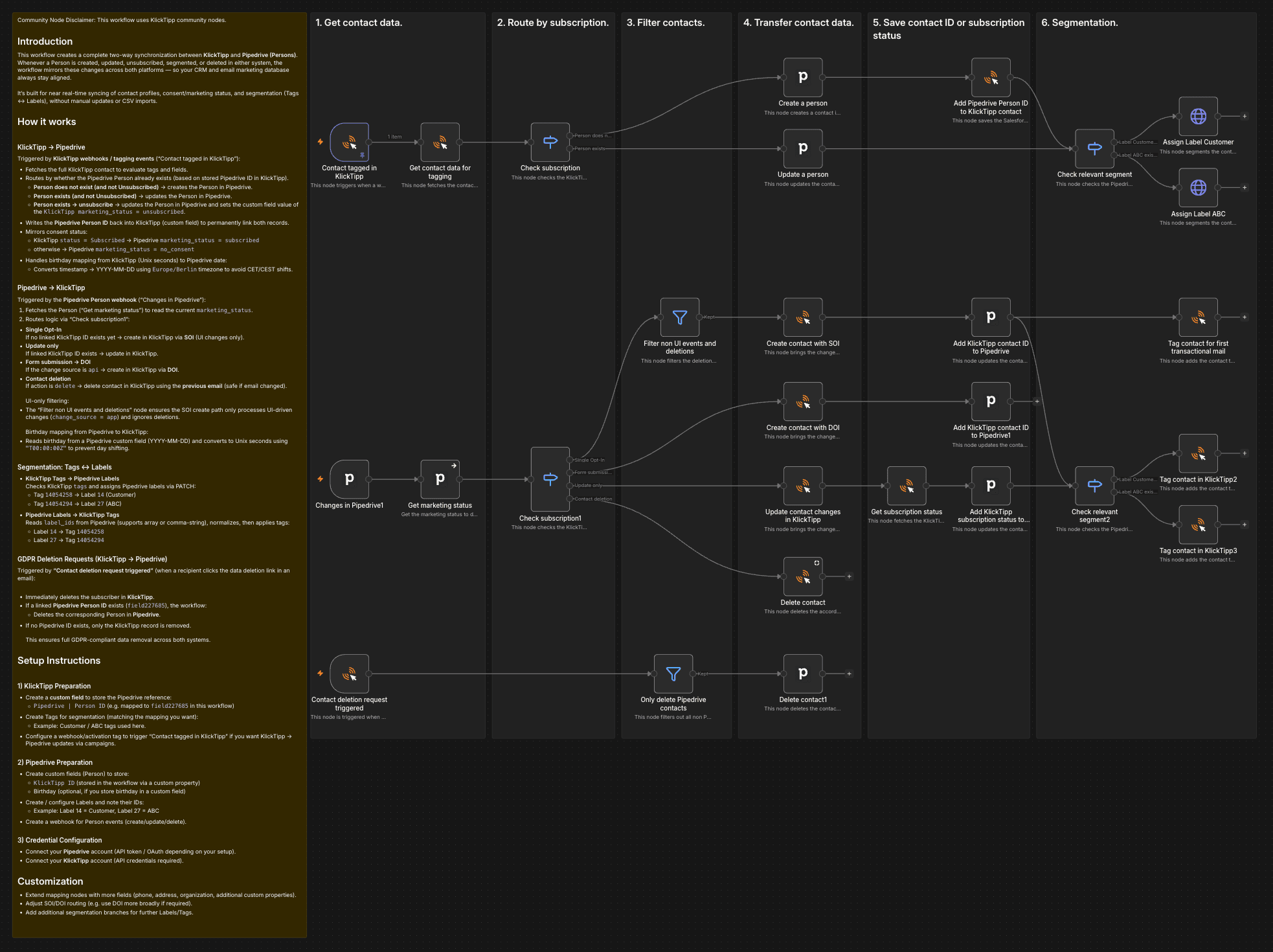
This workflow creates a complete two-way synchronization between KlickTipp and Pipedrive (Persons).
Whenever a Person is created, updated, unsubscribed, segmented, or deleted in either system, the workflow mirrors these changes across both platforms — so your CRM and email marketing database always stay aligned.
It is designed for near real-time syncing of contact data, consent state, and segmentation (Tags ↔ Labels), without manual work.
KlickTipp → Pipedrive
Triggered by KlickTipp webhooks / activation tag events via “Contact tagged in KlickTipp”:
- Fetch contact details in KlickTipp (Get contact data for tagging) to access tags and custom fields.
- Route by contact state (Check subscription):
- Person does not exist (no stored Pipedrive ID in KlickTipp) and contact is not Unsubscribed → Create a person in Pipedrive.
- Person exists and contact is not Unsubscribed → Update a person in Pipedrive.
- Person exists → unsubscribe → Update a person and set
marketing_status = unsubscribed.
- Write the Pipedrive Person ID back to KlickTipp (Add Pipedrive Person ID to KlickTipp contact) to permanently link both records.
- Sync consent status:
- KlickTipp
status = Subscribed→ Pipedrivemarketing_status = subscribed - Otherwise →
marketing_status = no_consent
- KlickTipp
- Sync birthday safely (timezone-aware):
- KlickTipp birthday is stored as Unix seconds and converted to
YYYY-MM-DDusingEurope/Berlintimezone to avoid CET/CEST shifts.
- KlickTipp birthday is stored as Unix seconds and converted to
- Segmentation: KlickTipp Tags → Pipedrive Labels:
- Reads KlickTipp tags (Check relevant segment) and assigns Pipedrive label IDs via PATCH:
- Tag
14054258→ Label14(Customer) - Tag
14054294→ Label27(ABC)
- Tag
- Reads KlickTipp tags (Check relevant segment) and assigns Pipedrive label IDs via PATCH:
Pipedrive → KlickTipp
Triggered by the Pipedrive Person webhook via “Changes in Pipedrive”:
- Fetch the current marketing status (Get marketing status) to decide which consent action to apply in KlickTipp.
- Route by sync scenario (Check subscription1):
- Single Opt-In
If no linked KlickTipp ID exists yet and status is notunsubscribed→ create contact in KlickTipp via SOI (Create contact with SOI). - Form submission → DOI
Ifchange_source = api→ create contact in KlickTipp via DOI (Create contact with DOI). - Update only
If linked KlickTipp ID exists and status is notunsubscribed→ update the existing KlickTipp subscriber (Update contact changes in KlickTipp). - Unsubscribe and update
If linked KlickTipp ID exists and status isunsubscribed→ unsubscribe the contact (Unsubscribe contact) and then update core fields (Update contact changes in KlickTipp1). - Contact deletion
If action isdelete→ delete the KlickTipp contact using the previous email (Delete contact) to remain safe even if the email changed before deletion.
- Single Opt-In
- UI-only filtering for SOI path
- Filter non UI events and deletions ensures the SOI create path processes only UI-driven events (
change_source = app) and ignores deletions.
- Filter non UI events and deletions ensures the SOI create path processes only UI-driven events (
- Sync birthday safely (no day shifting)
- Reads Pipedrive birthday as
YYYY-MM-DDfrom a custom field and converts it to Unix seconds using"T00:00:00Z"to prevent timezone-related day shifts.
- Reads Pipedrive birthday as
- Segmentation: Pipedrive Labels → KlickTipp Tags
- Reads
label_idsfrom Pipedrive (supports array or comma-separated string), normalizes them, then applies tags in KlickTipp (Check relevant segment2):- Label
14(Customer) → Tag14054258 - Label
27(ABC) → Tag14054294
- Label
- Reads
GDPR Deletion Requests (KlickTipp → Pipedrive)
Triggered by “Contact deletion request triggered” (when a recipient clicks the data deletion link in an email):
- Immediately deletes the subscriber in KlickTipp.
- If a linked Pipedrive Person ID exists (
field227685), the workflow:- Deletes the corresponding Person in Pipedrive.
- If no Pipedrive ID exists, only the KlickTipp record is removed.
This ensures full GDPR-compliant data removal across both systems.
How to set up
- Install the KlickTipp community node in your self-hosted n8n instance.
- Create credentials in n8n for:
- KlickTipp API
- Pipedrive API (token or OAuth)
- In KlickTipp, create a custom field to store the Pipedrive reference:
- Example used here:
Pipedrive | Person ID(mapped asfield227685)
- Example used here:
- In Pipedrive (Person), create custom fields to store:
- KlickTipp Contact ID (stored via Pipedrive custom properties)
- Birthday (optional, if you want birthday sync)
- Configure your segmentation mapping:
- Ensure Pipedrive Labels exist and note their IDs (e.g.
14 = Customer,27 = ABC) - Ensure KlickTipp Tags exist and note their IDs (e.g.
14054258,14054294)
- Ensure Pipedrive Labels exist and note their IDs (e.g.
- Test both directions:
- Add a tag in KlickTipp → confirm the Person is created/updated in Pipedrive and labels are assigned.
- Update a Person in Pipedrive → confirm the subscriber is created/updated/unsubscribed in KlickTipp accordingly.
- Activate the workflow.
💡 Pro Tip: Start testing with a single contact and one label/tag mapping first, then expand to more fields and segments.
Requirements
- Self-hosted n8n instance (community nodes supported)
- KlickTipp account with API access
- Pipedrive account with API access
- Pipedrive Person webhook enabled (create/update/delete events)
- KlickTipp webhook/activation tag configured to trigger the KlickTipp side
How to customize
- Add more field mappings (organization, address, custom properties, owner).
- Extend segmentation rules (more labels/tags, deal-based logic, pipeline-specific tags).
- Adjust SOI/DOI routing (e.g., force DOI for certain sources or segments).
- Add audit logging (Google Sheets, database, or Slack alerts on errors).
- Add safeguards (e.g., skip contacts without email, handle duplicates with additional lookup logic).