Back to Templates


💥 Automate multi-format design creation in Abyssale and publish via Blotato
📄 Documentation: Notion Guide
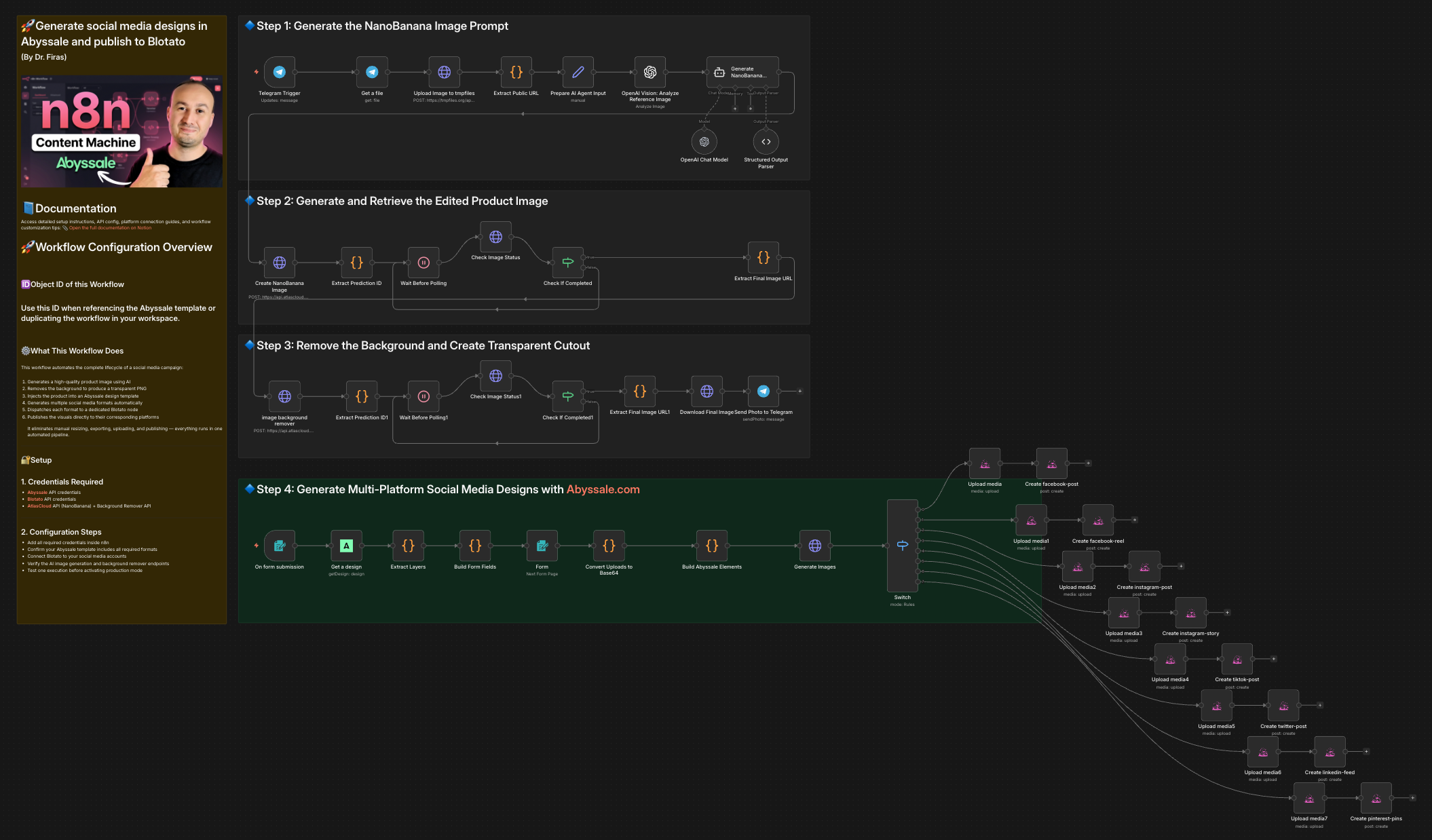
This workflow automates the creation of multi-format social media visuals using Abyssale and publishes them directly to social platforms via Blotato. It includes AI-based product image generation, background removal, dynamic design customization, and multi-channel distribution.
Who is this for?
- Marketers and growth teams managing multiple social platforms
- E-commerce brands launching product campaigns
- Agencies producing multi-format creatives at scale
- Automation builders who want end-to-end design + publishing in one workflow
What problem is this workflow solving? / Use case
Creating platform-specific visuals manually is time-consuming.
Each social network requires different dimensions and formats.
Design → Export → Resize → Upload → Publish quickly becomes repetitive and inefficient.
This workflow solves that by:
- Generating a clean product image (PNG with transparent background)
- Injecting it automatically into an Abyssale design template
- Generating all required social media formats
- Publishing each format to the correct platform automatically
What this workflow does
-
Generate product image (AI)
- Creates a high-quality product image
- Ensures single product rendering unless otherwise requested
- Removes background and outputs transparent PNG
-
Customize design in Abyssale
- Loads selected template
- Builds editable form dynamically
- Allows image and text updates
- Generates multiple formats (Facebook, Instagram, LinkedIn, etc.)
-
Dispatch by format
- Uses a Switch node to route each format
- Each format is sent to a dedicated Blotato node
-
Publish to social platforms
- Facebook post
- Facebook feed
- Instagram post
- Instagram story
- LinkedIn feed
- Twitter/X post
- Pinterest pins
- Tiktok post
Each format is automatically matched with its corresponding publishing node.
Setup
-
Credentials required
- Abyssale API credentials
- Blotato API credentials
- AtlasCloud API (NanoBanana) + Background remover API
-
Configure template
- Select your Abyssale template ID
- Ensure all required formats are enabled in the template
-
Set publishing destinations
- Connect Blotato accounts to your social platforms
- Map each format to the correct channel
-
Optional
- Adjust polling timing for image generation
- Modify default caption input
How to customize this workflow to your needs
- Replace the AI image generation model
- Modify the prompt rules (e.g., product style, realism, lighting)
- Add or remove social platforms
- Change the Abyssale template
- Add approval step before publishing
- Add scheduling instead of instant publishing
- Insert analytics tracking after posting
You can also extend it by:
- Adding email notifications
- Storing generated images in cloud storage
- Logging posts in a database
- Creating A/B variations automatically
This workflow enables a fully automated pipeline from product idea to published multi-platform campaign with minimal manual work.
🎥 Watch This Tutorial
👋 Need help or want to customize this?
📩 Contact: LinkedIn
📺 YouTube: @DRFIRASS
🚀 Workshops: Mes Ateliers n8n
Need help customizing?
Contact me for consulting and support : Linkedin / Youtube / 🚀 Mes Ateliers n8n