Back to Templates



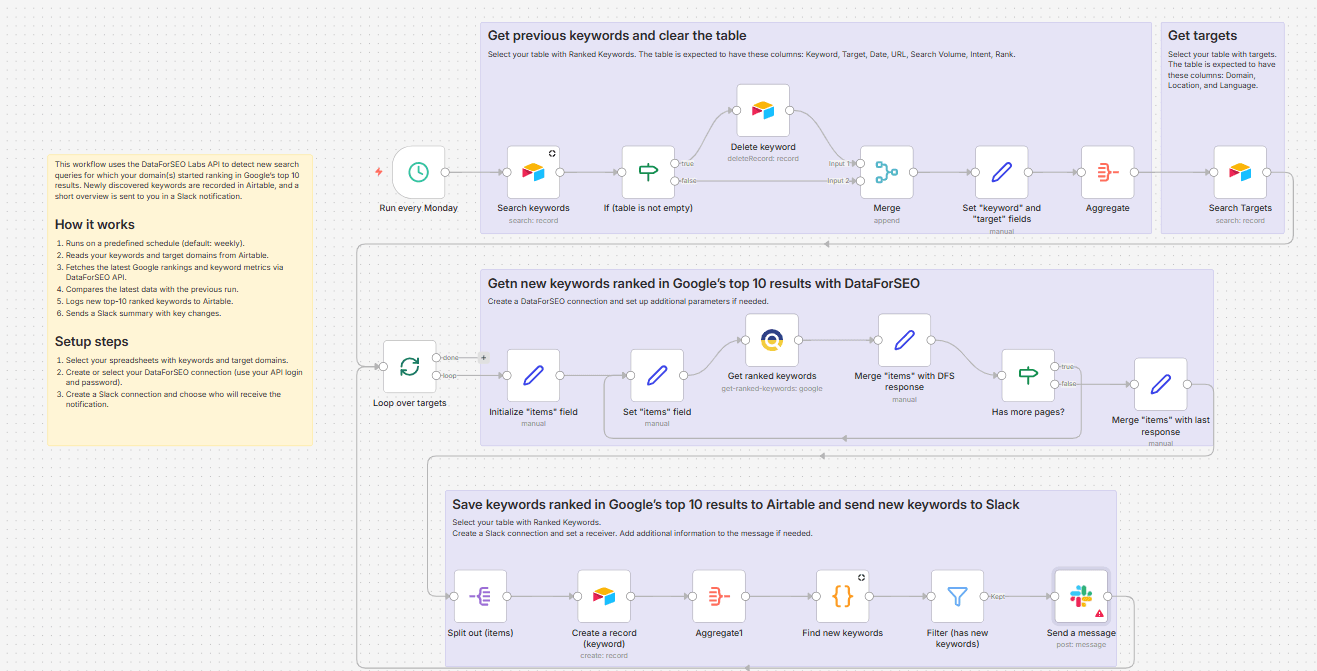
This weekly workflow automatically identifies new ranked keywords for your domain within Google’s top 10 results without manual SERP monitoring. On each run, the workflow fetches the latest ranking and search volume data using the DataForSEO Labs API and stores a fresh results snapshot in Airtable. It then compares this data with the previous set to identify any new keywords your domain started ranking for, focusing on queries that rank in the top 10.
All newly ranked top-10 keywords are logged in Airtable, along with their ranking position and search volume. Once new terms and rankings are identified, the workflow sends you a Slack summary highlighting the latest changes.
Who’s it for
SEO experts and marketers who want an automated way to track new top-ranking keywords on Google for their domain(s).
What it does
This workflow automatically detects when your domain enters top-10 results for new keywords on Google, records them in Airtable, and sends a weekly summary via Slack.
How it works
Runs on a predefined schedule (default: weekly).
Reads your keywords and target domains from Airtable.
Fetches the latest Google rankings and keyword metrics via DataForSEO API.
Compares the latest data with the previous run.
Logs newly ranked top-10 keywords to Airtable.
Sends a Slack summary with key changes.
Requirements
- DataForSEO account and API credentials
- Airtable table with your keywords, following the required column structure.
- Airtable table with your target domains, following the required column structure.
- Slack account
Customization
You can easily customize this workflow by adjusting the run schedule, changing the minimum ranking threshold (e.g., top 5 or top 20), exporting results to other tools, and tailoring the Slack message content to your team’s workflow.