Back to Templates


Community Node Disclaimer
This workflow uses KlickTipp community nodes, available for self-hosted n8n instances only.
Who’s it for
Sales and marketing teams using Salesforce (Contacts) and KlickTipp who need a reliable, automated two-way synchronization for:
- Contact Profiles: Syncing name, email, address, mobile, and birthday.
- Marketing Status: Aligning subscription and consent states.
- Segmentation: Mapping KlickTipp Tags to Salesforce Topics.
- Data Integrity: Automating deletions for daily cleanups and GDPR requests.
This workflow eliminates manual CSV imports and ensures your CRM and marketing database are always in perfect alignment.
How it works
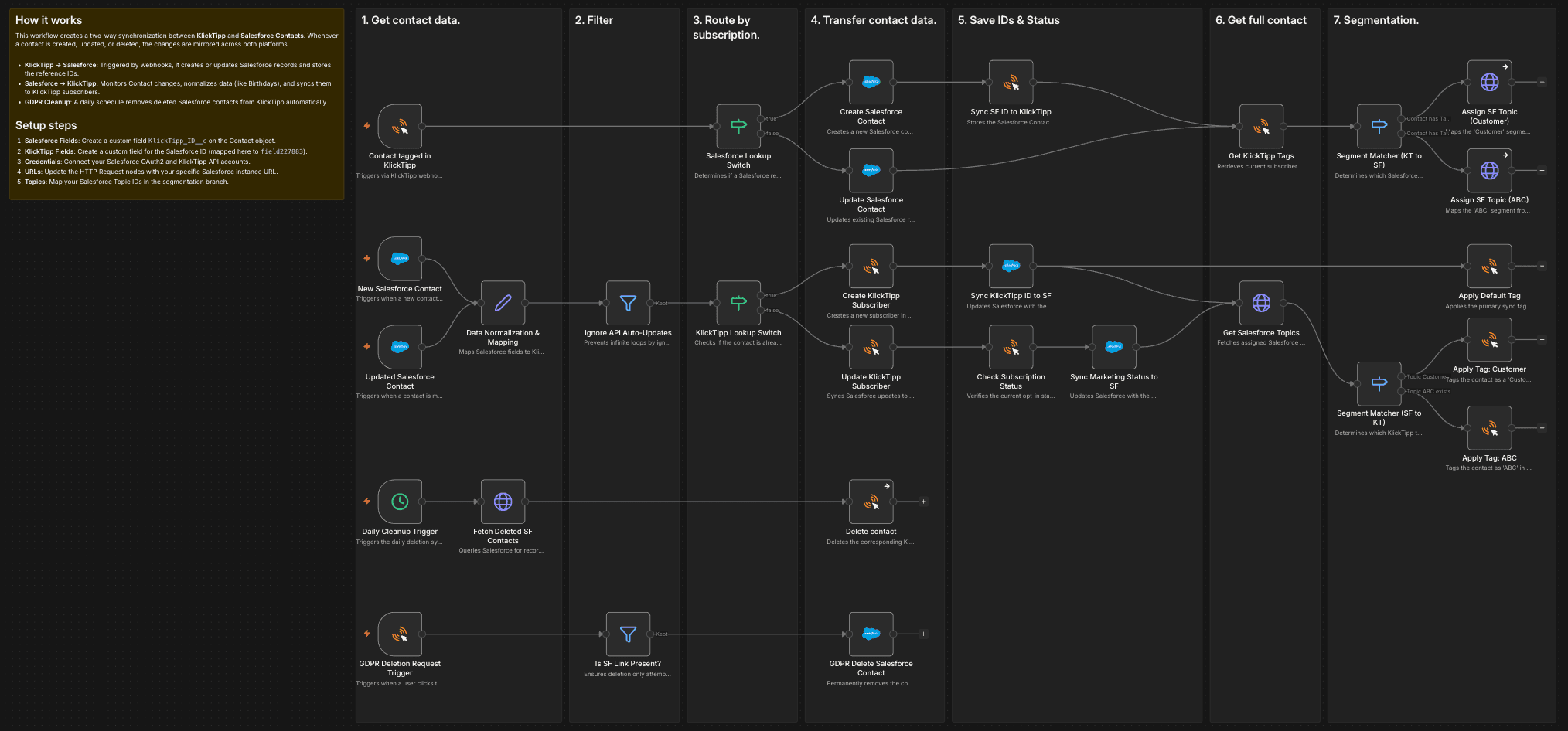
This workflow synchronizes data between KlickTipp and Salesforce Contacts in near real-time. Changes made in one platform are mirrored in the other to maintain a single source of truth.
KlickTipp → Salesforce
Triggered by KlickTipp webhooks or activation tags via the Contact tagged in KlickTipp node:
- Data Fetching: The workflow retrieves subscriber details, including tags and custom fields.
- Logic Branching: The Salesforce Lookup Switch checks if a Salesforce Contact ID is already stored in KlickTipp (
field227883).- New Contacts: Creates a new record in Salesforce.
- Existing Contacts: Updates the current Salesforce record.
- Linkage: The Sync SF ID to KlickTipp node writes the Salesforce ID back to KlickTipp to permanently link the records.
- Field Mapping: Marketing status and birthdays are synced. Birthdays are processed using a timezone-aware logic (Europe/Berlin) to ensure accuracy.
- Segmentation: The Segment Matcher reads KlickTipp tags and assigns corresponding Salesforce Topics (e.g., Tag
14061012→ TopicCustomer).
Salesforce → KlickTipp
Triggered by the New Salesforce Contact or Updated Salesforce Contact triggers:
- Normalization: The Data Normalization & Mapping node ensures consistent data formats (e.g., converting Salesforce dates to KlickTipp Unix timestamps).
- Logic Branching: The KlickTipp Lookup Switch checks for an existing KlickTipp ID.
- New Subscribers: Triggers a Single Opt-In (SOI) creation.
- Existing Subscribers: Updates the profile data.
- Status Sync: The Sync KlickTipp ID to SF node updates the CRM with the KlickTipp ID and sets the initial marketing status.
- Segmentation: The Segment Matcher reads Salesforce TopicAssignments and applies the matching tags in KlickTipp.
Automated Deletions
- Daily Cleanup: The Daily Cleanup Trigger runs every morning at 08:00. It fetches contacts deleted in Salesforce within the last 24 hours and removes them from KlickTipp.
- GDPR Requests: Triggered by KlickTipp deletion requests. If the subscriber is linked to Salesforce, the GDPR Delete Salesforce Contact node removes the CRM record automatically.
Setup steps
- Install Community Nodes: Ensure the KlickTipp community node is installed on your n8n instance.
- Prepare Custom Fields:
- KlickTipp: Create a field for the Salesforce ID (mapped to
field227883). - Salesforce: Create
KlickTipp_ID__candKlickTipp_marketing_status__con the Contact object.
- KlickTipp: Create a field for the Salesforce ID (mapped to
- Credentials: Configure your KlickTipp API and Salesforce OAuth2 credentials.
- Map Segments: Update the Segment Matcher nodes with your specific Tag IDs and Salesforce Topic IDs.
- Instance URLs: Update all HTTP Request nodes with your specific Salesforce instance base URL.
- Test & Activate: Run a manual test for one contact in both directions before activating the workflow.
Requirements
- Self-hosted n8n instance.
- KlickTipp account with API access.
- Salesforce account with API access (OAuth2).
- Correct permissions for
queryAll(Salesforce) and Webhook triggers (KlickTipp).
How to customize
- Expand Mapping: Add more fields like Phone, Mailing Street, or Custom Properties in the "Update/Create" nodes.
- Adjust Schedule: Change the Daily Cleanup Trigger to run more or less frequently based on your needs.
- Refine Logic: Add filters to skip specific contacts (e.g., internal staff) or handle duplicates.