

Community Node Disclaimer
This workflow uses KlickTipp community nodes, available for self-hosted n8n instances only.
Introduction
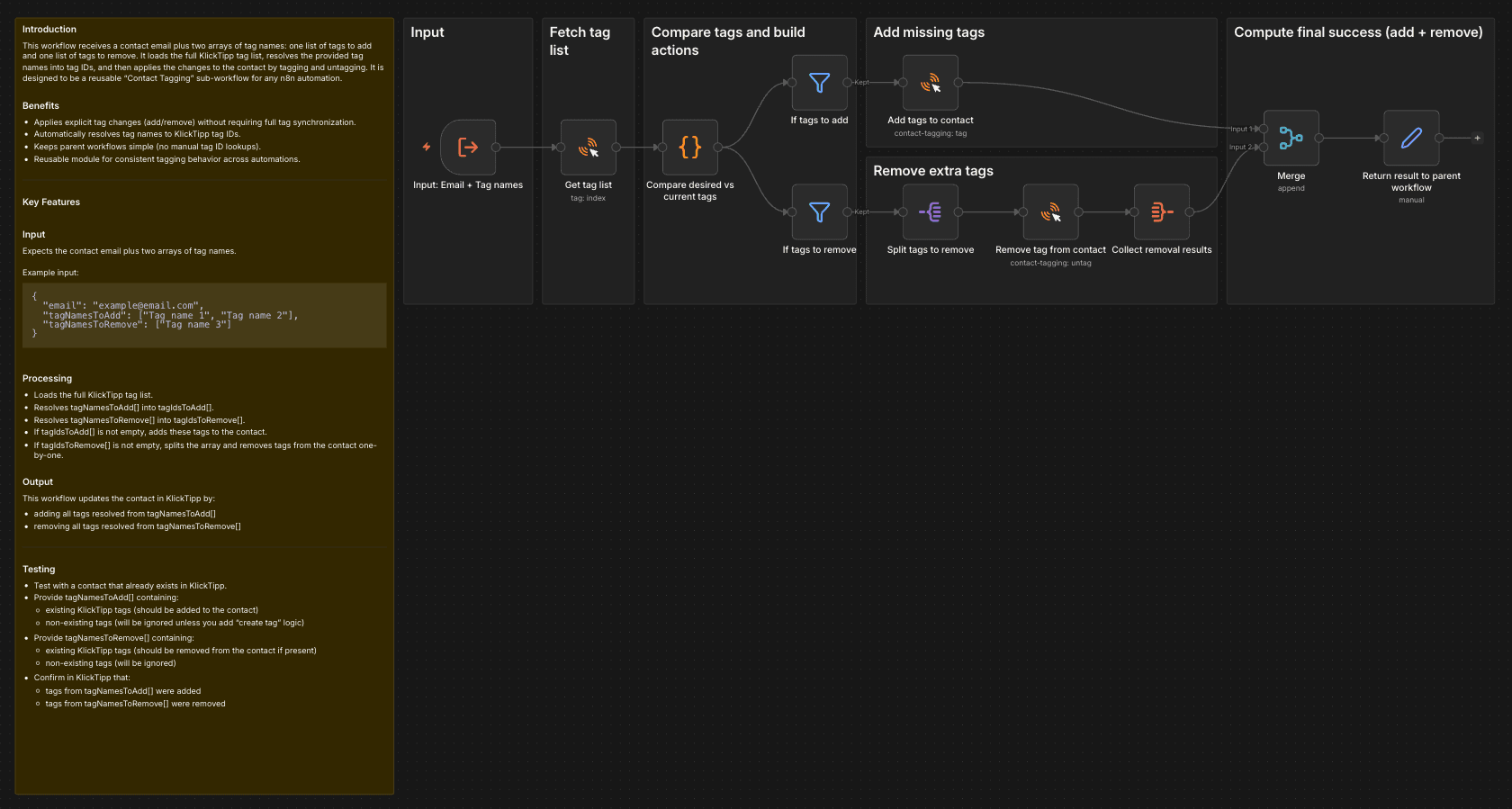
This workflow receives a contact email plus two arrays of tag names: one list of tags to add and one list of tags to remove. It loads the full KlickTipp tag list, resolves the provided tag names into tag IDs, and then applies the changes to the contact by tagging and untagging. It is designed to be a reusable "Contact Tagging" sub-workflow for any n8n automation.
Benefits
- Applies explicit tag changes (add/remove) without requiring full tag synchronization.
- Automatically resolves tag names to KlickTipp tag IDs.
- Keeps parent workflows simple (no manual tag ID lookups).
- Reusable module for consistent tagging behavior across automations.
Key Features
Input
Expects the contact email plus two arrays of tag names.
Example input:
{
  "email": "[email protected]",
  "tagNamesToAdd": ["Tag name 1", "Tag name 2"],
  "tagNamesToRemove": ["Tag name 3"]
}
Processing
- Loads the full KlickTipp tag list.
- Resolves tagNamesToAdd[] into tagIdsToAdd[].
- Resolves tagNamesToRemove[] into tagIdsToRemove[].
- If tagIdsToAdd[] is not empty, adds these tags to the contact.
- If tagIdsToRemove[] is not empty, splits the array and removes tags from the contact one-by-one.
Output
This workflow updates the contact in KlickTipp by:
- adding all tags resolved from tagNamesToAdd[]
- removing all tags resolved from tagNamesToRemove[]
Testing
- Test with a contact that already exists in KlickTipp.
- Provide tagNamesToAdd[] containing:
- existing KlickTipp tags (should be added to the contact)
- non-existing tags (will be ignored unless you add “create tag” logic)
- Provide tagNamesToRemove[] containing:
- existing KlickTipp tags (should be removed from the contact if present)
- non-existing tags (will be ignored)
- Confirm in KlickTipp that:
- tags from tagNamesToAdd[] were added
- tags from tagNamesToRemove[] were removed