Back to Templates

⚠️ Important: This workflow uses the Autype community node and requires a self-hosted n8n instance.
This workflow shows how to turn a centrally managed Autype document template into a fully automated document generation pipeline: injecting dynamic data at render time to produce professional PDF, DOCX, or ODT files at scale. No manual editing of the template is ever required.
Who is this for?
This workflow is for developers, operations teams, and HR or finance departments who need to generate professional documents at scale (certificates, offer letters, invoices, reports, or contracts) where the layout and branding stay fixed but the content changes per recipient or record. It covers the full document automation lifecycle: template creation, variable injection, and output delivery.
What this workflow does
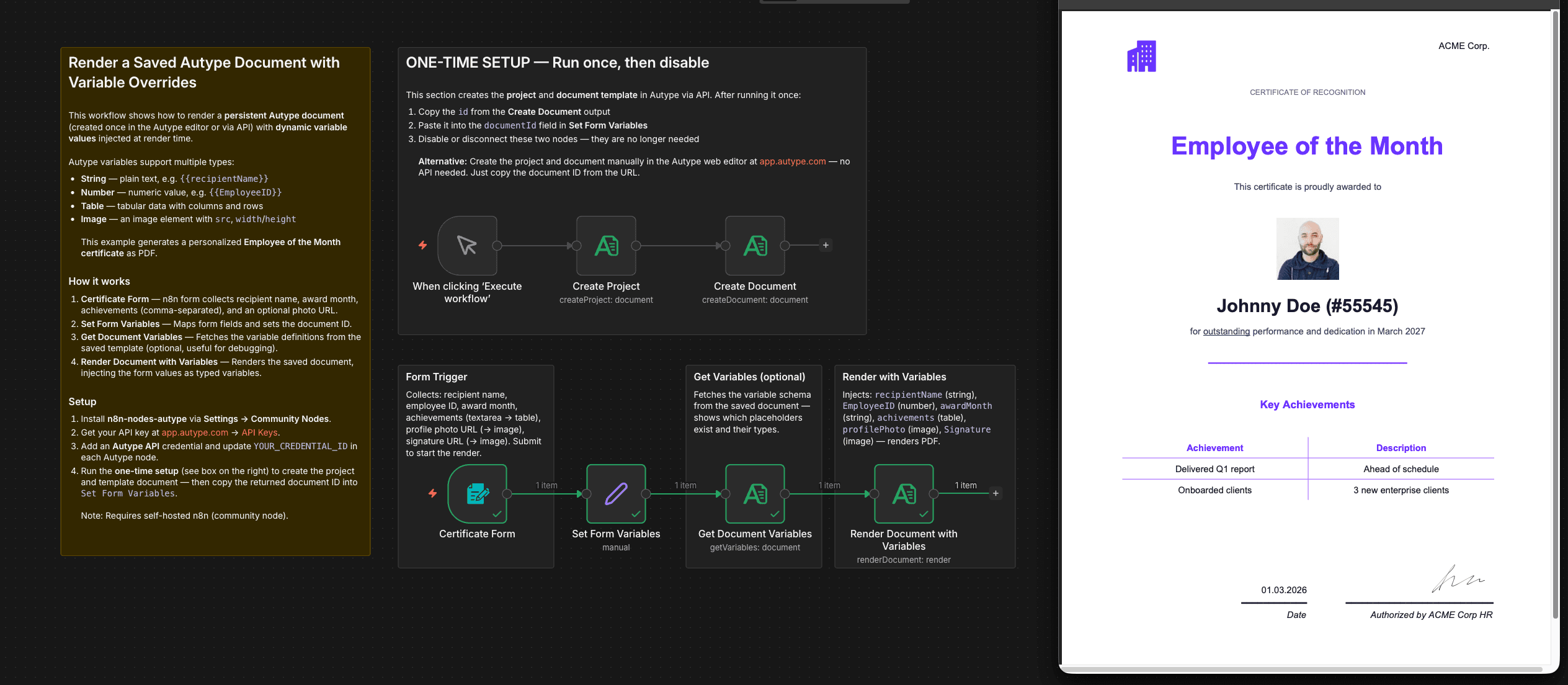
The example generates a personalized Employee of the Month certificate as a styled PDF including a company logo in the header, a profile photo, an achievements table, a current date, and a signature field. All content is injected dynamically via Autype's variable system without modifying the template itself.
The workflow demonstrates all major Autype variable types in one flow:
- Text: plain text, e.g. recipient name, award month
- Number: numeric values, e.g. employee ID
- Table: structured tabular data with column headers and rows
- Image: profile photos, signatures, or any image URL
It also includes a one-time setup section that creates the Autype project and document template entirely via API, so that the full pipeline can be bootstrapped from n8n without ever touching the web editor.
How it works
One-time setup (run once, then disable):
- Create Project: Creates an Autype project named "Certificates" via API.
- Create Document: Creates the template document with full content JSON (layout, styling defaults, variable placeholders) inside that project. Returns the document ID.
Main flow (runs every time):
3. Certificate Form: An n8n form collects: recipient name, employee ID, award month, achievements (textarea → parsed into a table variable), profile photo URL, and signature image URL.
4. Set Form Variables: Maps form fields, pre-computes the achievements data array, and stores the document ID.
5. Get Document Variables: Fetches the variable schema from the saved template (useful for debugging or dynamic form generation).
6. Render Document with Variables: Renders the saved template with all injected variable values and downloads the finished PDF.
Setup
- Install n8n-nodes-autype via Settings → Community Nodes (self-hosted n8n only).
- Get your API key at app.autype.com → API Keys.
- Add an Autype API credential in n8n and update
YOUR_CREDENTIAL_IDin each Autype node. - Run the one-time setup: Trigger the Create Project node manually, copy the document
idfrom the Create Document output, and paste it into thedocumentIdfield in Set Form Variables. Then disable the setup nodes.
Recommended: use the Autype web editor Instead of the One-Time Step: Creating and editing templates is much easier at app.autype.com. The AI agent in the editor can generate a complete document template from a single prompt with one click. Once saved, the document ID is visible directly in the URL, for example https://app.autype.com/document/a70a811d-a745-46f8-8eeb-bb9f2eb8cegb — where the last segment (a70a811d-a745-46f8-8eeb-bb9f2eb8cegb) is your document ID. Use the JSON/Markdown switch in the editor to view and copy the full document JSON, or open the Bulk tab to see exactly how the variable input structure should look.
Note: This is a community node and not maintained by the n8n team. Requires a self-hosted n8n instance.
Bulk document generation
This workflow is equally suited for bulk document generation : replace the Form Trigger with a database query, Google Sheets read, or webhook that returns multiple records, then loop over them using an n8n Split In Batches or Code node to render one document per record. Autype also provides a dedicated Bulk Render API that accepts a list of variable sets in one request for maximum throughput.
Requirements
- Self-hosted n8n instance (community nodes are not available on n8n Cloud)
- Autype account with API key (free tier available)
n8n-nodes-autypecommunity node installed
How to customize
- Output format: Change
document.typein the template JSON todocxorodtfor Word-compatible or OpenDocument output instead of PDF. - Different use case: Swap the certificate layout for invoices, offer letters, NDA contracts, or any business document. Update the variable names and form fields accordingly.
- Pull data dynamically: Replace the Form Trigger with a webhook, CRM read, database query, or HTTP request and map the response fields to your variable names.
- Skip variable lookup: If you already know your variable names, remove the Get Document Variables node and connect Set Form Variables directly to Render Document with Variables.
- JSON syntax reference: See all available document elements (tables, charts, images, page breaks, etc.) in the Autype JSON Syntax Reference.
- Post-processing: Use the Autype Tools API to further process the rendered PDF: add watermarks, password-protect the file, compress it, split pages, or rotate content — all directly from n8n.