Back to Templates

⚠️ Important: This workflow uses the Autype community node and requires a self-hosted n8n instance.
This workflow reads overdue invoices from a NocoDB database, generates a personalized payment reminder PDF for each record using the Autype Bulk Render API, and sends the resulting ZIP archive by email via SMTP. Days overdue are calculated automatically from the due date at runtime. Supported output formats: PDF, DOCX (Word), ODT.
Who is this for?
Finance teams, accounting departments, and developers who want to automate recurring document generation from database records. Good fit for payment reminders, invoices, collection letters, dunning notices, or any business correspondence that goes out in batches.
What this workflow does
It reads all overdue invoices from a NocoDB table, maps each row to a set of document variables, and sends everything to the Autype Bulk Render API in a single batch request. The result is a ZIP archive with one PDF per invoice, which gets sent by email via SMTP on a weekly schedule.
The included payment reminder template includes:
- Company logo in the header, page numbers in the footer
- Customer name and full address block
- Invoice details table with USD amounts
- Styled table with alternating row colors
- Automatic date insertion via
{{date/DD.MM.YYYY}} - Days overdue calculated at runtime from
due_date(no separate DB column needed)
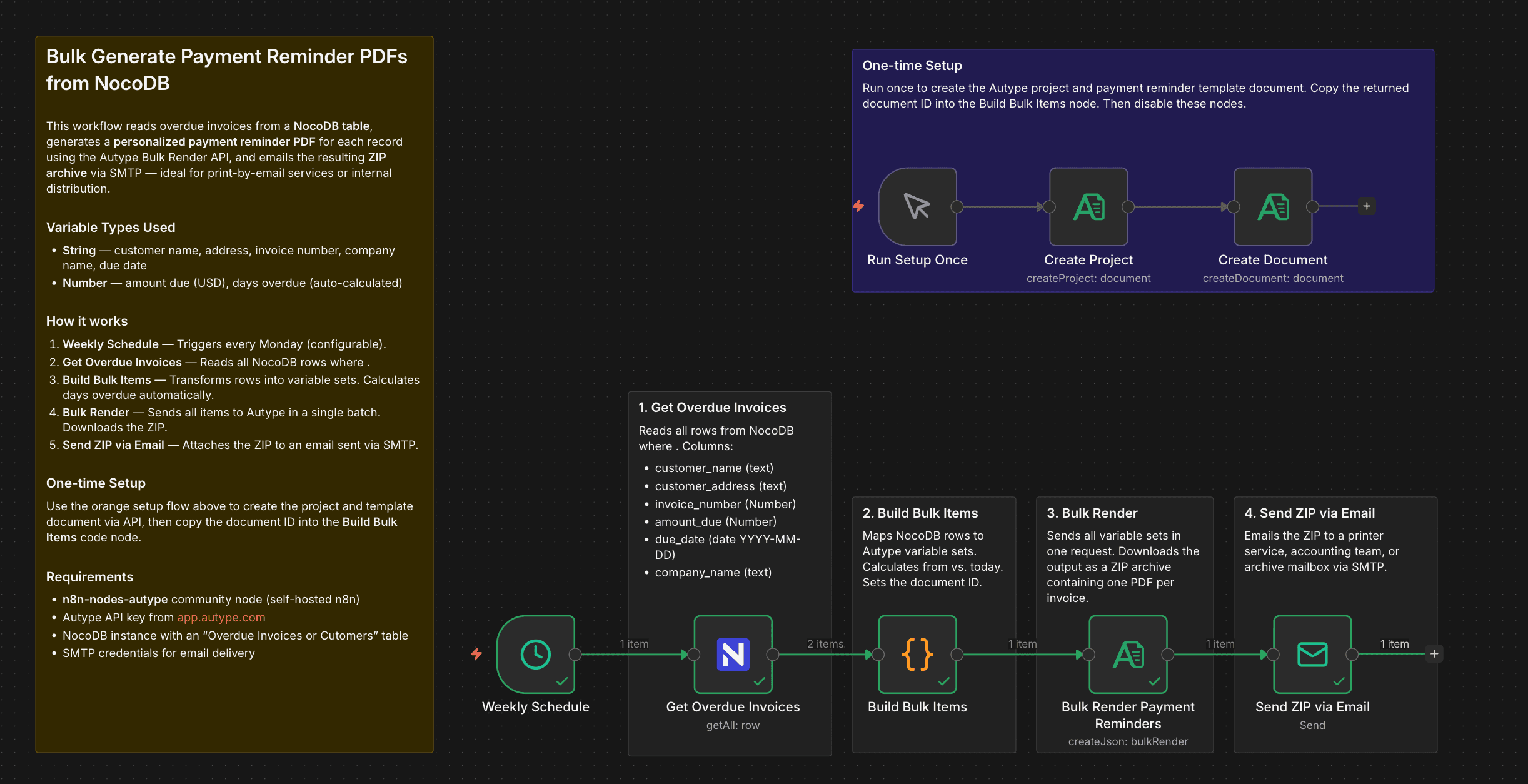
There is also a one-time setup flow (orange sticky note) that creates the Autype project and document template via API.
NocoDB Table Structure
Create a table called Overdue Invoices with the following columns:
| Column | Type | Example |
|---|---|---|
customer_name |
Text | Jane Smith |
customer_address |
Text | 742 Evergreen Terrace, Springfield, IL 62704 |
invoice_number |
Text | INV-2026-0042 |
amount_due |
Number | 1,250.00 |
due_date |
Date | 2026-02-15 |
company_name |
Text | TechStart Inc. |
days_overdueis not stored in the database. The workflow calculates it fromdue_dateat runtime. Amounts are rendered in USD. Change the template if you need a different currency.
Test Data
Use these two sample records to test the workflow:
Record 1:
| Column | Value |
|---|---|
customer_name |
Jane Smith |
customer_address |
742 Evergreen Terrace, Springfield, IL 62704 |
invoice_number |
INV-2026-0042 |
amount_due |
1250.00 |
due_date |
2026-02-01 |
company_name |
TechStart Inc. |
Record 2:
| Column | Value |
|---|---|
customer_name |
Robert Chen |
customer_address |
88 Innovation Drive, Suite 400, Austin, TX 73301 |
invoice_number |
INV-2026-0078 |
amount_due |
3480.50 |
due_date |
2026-01-15 |
company_name |
DataFlow GmbH |
How it works
One-time setup (run once, then disable):
- Run Setup Once — triggers the setup flow manually.
- Create Project — creates an Autype project named "Payment Reminders".
- Create Document — creates the payment reminder template and returns the document ID.
Main flow (weekly):
4. Weekly Schedule — runs every Monday by default.
5. Get Overdue Invoices — fetches all NocoDB rows where due_date < today.
6. Build Bulk Items — maps rows to Autype variable sets and calculates daysOverdue from due_date.
7. Bulk Render Payment Reminders — sends all items in one API call, waits for completion, downloads the ZIP.
8. Send ZIP via Email — sends the ZIP via SMTP to a print service, accounting inbox, or document archive.
Setup
- Install n8n-nodes-autype via Settings → Community Nodes (self-hosted n8n only).
- Get your API key at app.autype.com → API Keys.
- Add an Autype API credential in n8n and update
YOUR_CREDENTIAL_IDin each Autype node. - Set up a NocoDB instance and create the "Overdue Invoices" table with the columns listed above. Add NocoDB API credentials in n8n.
- Configure SMTP credentials in n8n for email delivery.
- Run the one-time setup: Click Run Setup Once, then copy the document
idfrom the Create Document output and paste it into theBuild Bulk Itemscode node (replaceYOUR_DOCUMENT_ID). Then disable the setup nodes.
Tip: It is easier to create and edit templates directly in the Autype web editor. The built-in AI agent can generate a full template from a single prompt. Once saved, the document ID is in the URL, e.g. https://app.autype.com/document/a70a811d-a745-46f8-8eeb-bb9f2eb8cegb. Use the JSON/Markdown switch to inspect the document JSON, or the Bulk tab to check the expected variable structure.
Note: This is a community node so it Requires a self-hosted n8n instance.
Requirements
- Self-hosted n8n instance (community nodes are not available on n8n Cloud)
- Autype account with API key (free tier available, paid plan recommended for bulk rendering)
n8n-nodes-autypecommunity node installed- NocoDB instance with API access
- SMTP server for email delivery
How to customize
- Currency: Change
$ {{amountDue}}in the document JSON to any other symbol if needed. - Output format: Set
document.typetodocxorodtfor Word or OpenDocument output. - Data source: The NocoDB node can be swapped for Google Sheets, Airtable, PostgreSQL, MySQL, or any other n8n data source. Just map the field names in the Code node.
- Document type: Replace the payment reminder layout with invoices, contracts, certificates, or any other document. Update the template and variable mappings to match.
- Individual emails: Use Split In Batches to loop over the output and send each PDF to the corresponding customer directly.
- Schedule: Adjust the Schedule Trigger to run daily, monthly, or swap it for a webhook trigger.
- JSON syntax: All available document elements are documented in the Autype JSON Syntax Reference.
- Post-processing: The Autype Tools API supports watermarks, password protection, compression, merging, and format conversion.