Back to Templates


Monitor GitHub Repositories for Unauthorized Actions
How it works:
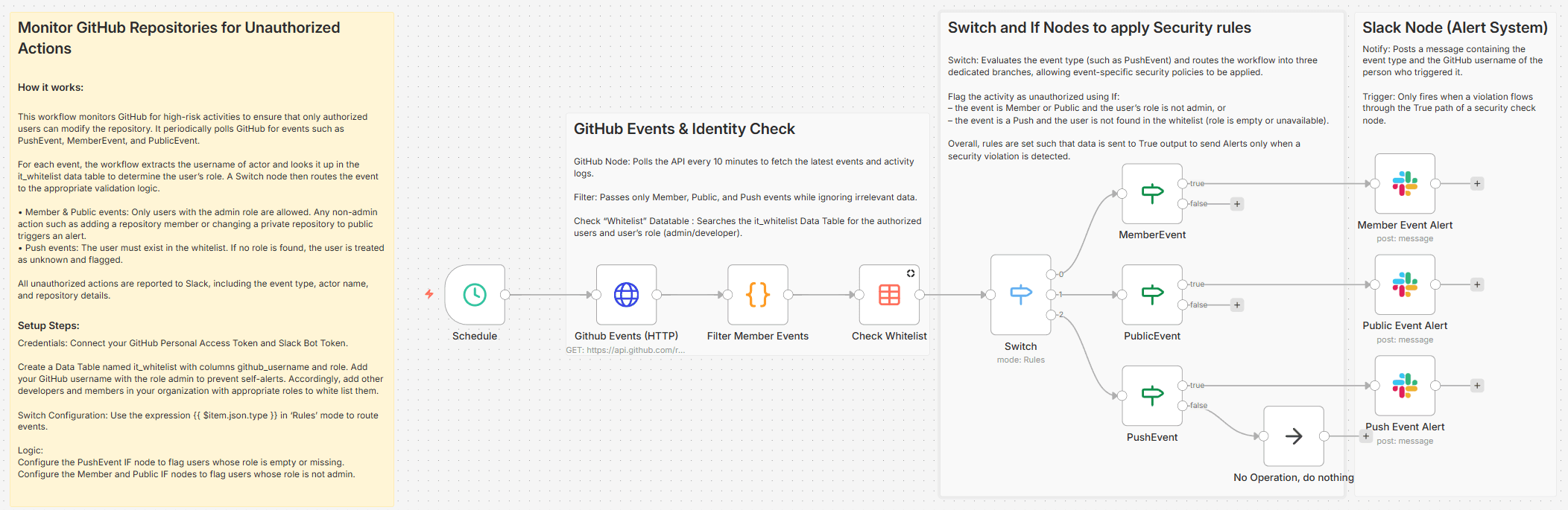
This workflow monitors GitHub for high-risk activities to ensure that only authorized users can modify the repository. It periodically polls GitHub for events such as PushEvent, MemberEvent, and PublicEvent.
For each event, the workflow extracts the username of actor and looks it up in the it_whitelist data table to determine the user’s role. A Switch node then routes the event to the appropriate validation logic.
• Member & Public events: Only users with the admin role are allowed. Any non-admin action such as adding a repository member or changing a private repository to public triggers an alert.
• Push events: The user must exist in the whitelist. If no role is found, the user is treated as unknown and flagged.
All unauthorized actions are reported to Slack, including the event type, actor name, and repository details.
Setup steps:
Credentials: Connect your GitHub Personal Access Token and Slack Bot Token.
Create a Data Table named it_whitelist with columns github_username and role. Add your GitHub username with the role admin to prevent self-alerts. Accordingly, add other developers and members in your organization with appropriate roles to white list them.
Switch Configuration: Use the expression {{ $item.json.type }} in 'Rules' mode to route events.
Logic:
Configure the PushEvent IF node to flag users whose role is empty or missing.
Configure the Member and Public IF nodes to flag users whose role is not admin.