Back to Templates



Workflow Introduction
Core Competence
Our invoice extraction workflow is completed end-to-end automatically: Gmail invoice email screening → extraction of key fields from multi-format invoices → automatic archiving of results to Google Drive, replacing the repetitive manual labor of finance staff in opening and entering invoices.
Differentiated Advantage
- High Accuracy: The extraction accuracy of core fields is 91%+, far exceeding that of similar products in the industry;
- Advantages of table extraction: For invoices containing tables, the line-extract technology has a significant extraction effect;
- Multi-format Compatibility: Natively supports invoice formats such as PDF, images, Word, Excel, etc., without the need for conversion;
- Lightweight Integration: Seamlessly integrates with Gmail and Google Drive, Out Of The Box.
Company Introduction
Laiye ADP (Agentic Document Processing), based on large language models and vision-language models, combined with agent technology, is a new generation platform that enables end-to-end automated document processing.
For more information, please visit the official website of Laiye Technology: ++https://laiye.com/++
Use Cases
- Multi-supplier integration: Efficiently process invoices from multiple suppliers, automatically extract key invoice information for archiving;
- Accounting firms batch process large amounts of invoice data: they can handle the increased invoice processing. requirements brought about by the growth in the number of clients without adding staff;
- Cross-border trade enterprises: For multi-language/complex layout overseas invoice scenarios, without the need for manual setup and human processing, achieve understanding of documents and then complete extraction of important data;
- Small and Medium-sized Technology Enterprises: Quickly identify important information such as invoice date, invoice amount, and invoice number from employee reimbursement invoices, and say goodbye to manual data entry.
How it works
Step 1: Complete Gmail authorization
You need to authorize your Google email. We will automatically obtain your email attachments from Google email. To accurately obtain and identify the invoice attachments, you can set up your email filter configuration by yourself, for example:
- Emails with attachments and subjects containing keywords like "invoice";
- Emails from supplier;
- Emails under the designated label.
Step 2: Automate document filtering
We have configured the document automatic filterer for you, which will filter out the documents that meet the automated processing flow. There is no need for manual operation.
For those that do not meet the conditions, our workflow will store these documents in the designated folder for quick retrieval during manual processing. There is no need to sift through emails one by one.
The documents that we preset for automatic processing include the following conditions (union):
- The attachment title contains text: invoice, receipt, expenses, fee (any one of them is sufficient. If you want to match other commonly used words in actual business, you can directly modify the
{{ $json.attachment_extension }}
field in the filter to assign the value. - File size: < 50MB
- File format: .jpeg, .jpg, .png, .bmp, .tiff, .pdf, .doc, .docx, .xls, .xlsx.
Step 3: Complete ADP permission configuration
- You need to go to adp.laiye.com to register for free, after which you can obtain 100 free calls per month
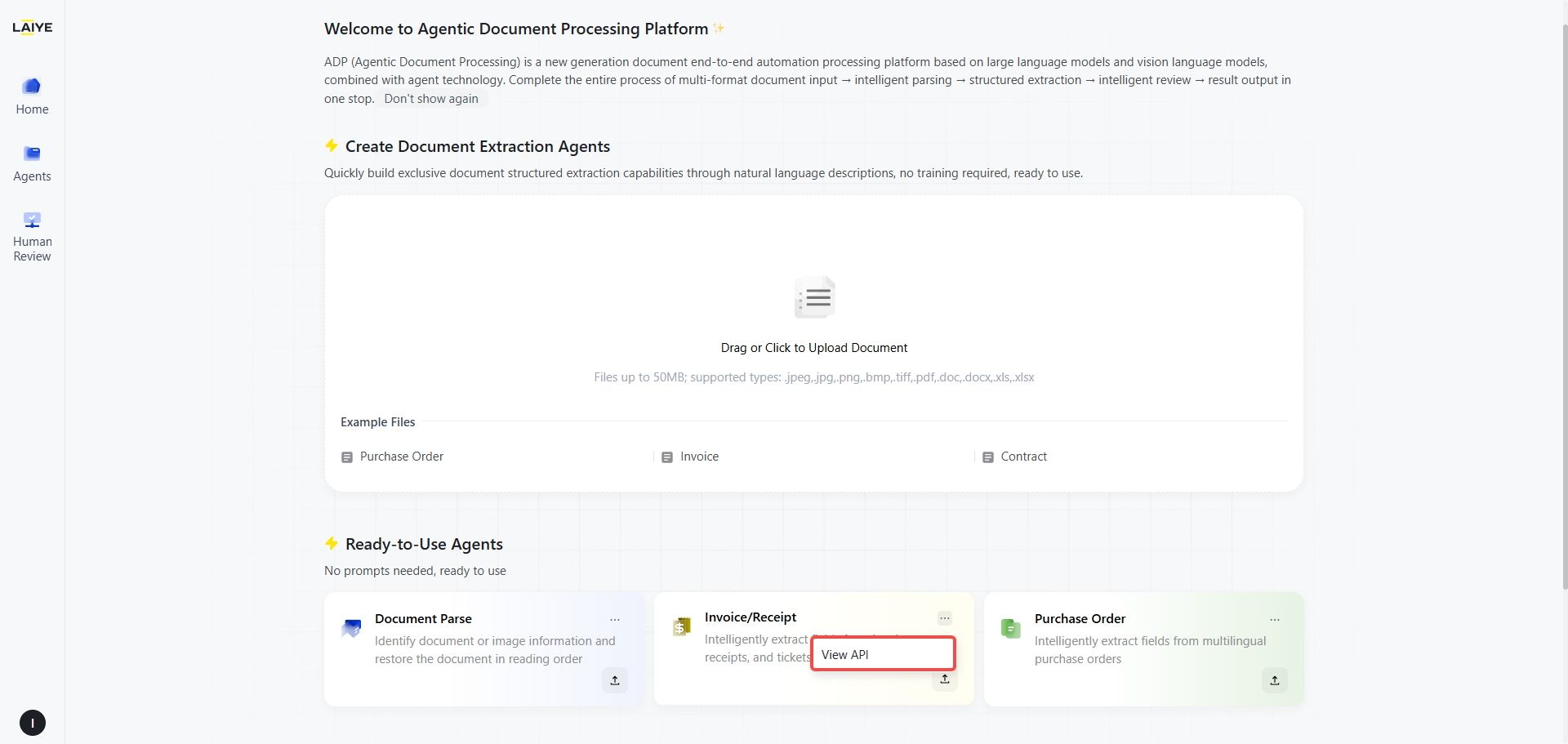
- Select the Out Of The Box Agent Application-Invoice/Receipt Card, and click the more menu [...] on the card to directly obtain your exclusive API Key, App Secret, and Access Key
- Simply fill the obtained Key into the configuration item of the 【Laiye ADP HTTP Request Node】
- After ADP completes invoice extraction, it will return structured Json data, which includes more than 10 text fields, such as "Invoice Name", "Invoice Number", "Invoice Date", etc., as well as complete invoice table fields, such as "Item Name", "Description", "Quantity", "Unit Price", etc.
Step 4: Complete Google Drive authorization
- Files processed by ADP will be automatically converted into binary data to ensure smooth import into Google Drive (Sheet)
- Files that have not undergone ADP processing will be saved as the original files to the [Untreated Document] folder. If all files have been automatically processed, this folder will not be created
- Extracted documents can be automatically saved to any folder you specify. By default, they are stored in MY Drive. If you wish to save them to a custom folder, simply modify the Parent Folder setting
Professional Community and Latest News
Follow us on LinkedIn for more updates! ++https://www.linkedin.com/company/laiye++
- We will share the latest updates on Laiye ADP products;
- You can share your successful invoice processing cases.
Problems & Support
If you encounter any issues during use, you can try contacting us for technical support ([email protected]++), and your message requesting technical support can include the following content:
- Describe the problem you encountered in as much detail as possible
- Your current invoice processing volume and type
- The specific supplier format or invoice layout you handle
- Target Accounting Software or System Integration
- Any technical errors or issues with extraction accuracy
- Current manual processing workflow and pain points
Response time: within 24 hours on working days
Professional Areas: Invoice Processing Automation, Order Processing Automation, Receipt Processing Automation