Back to Templates


⚠️ This template uses the Trilox community node (n8n-nodes-trilox) and requires self-hosted n8n.
Who is this for
n8n developers building Telegram chatbots who need to take over from the bot when it fails — without the customer getting double replies.
How it works
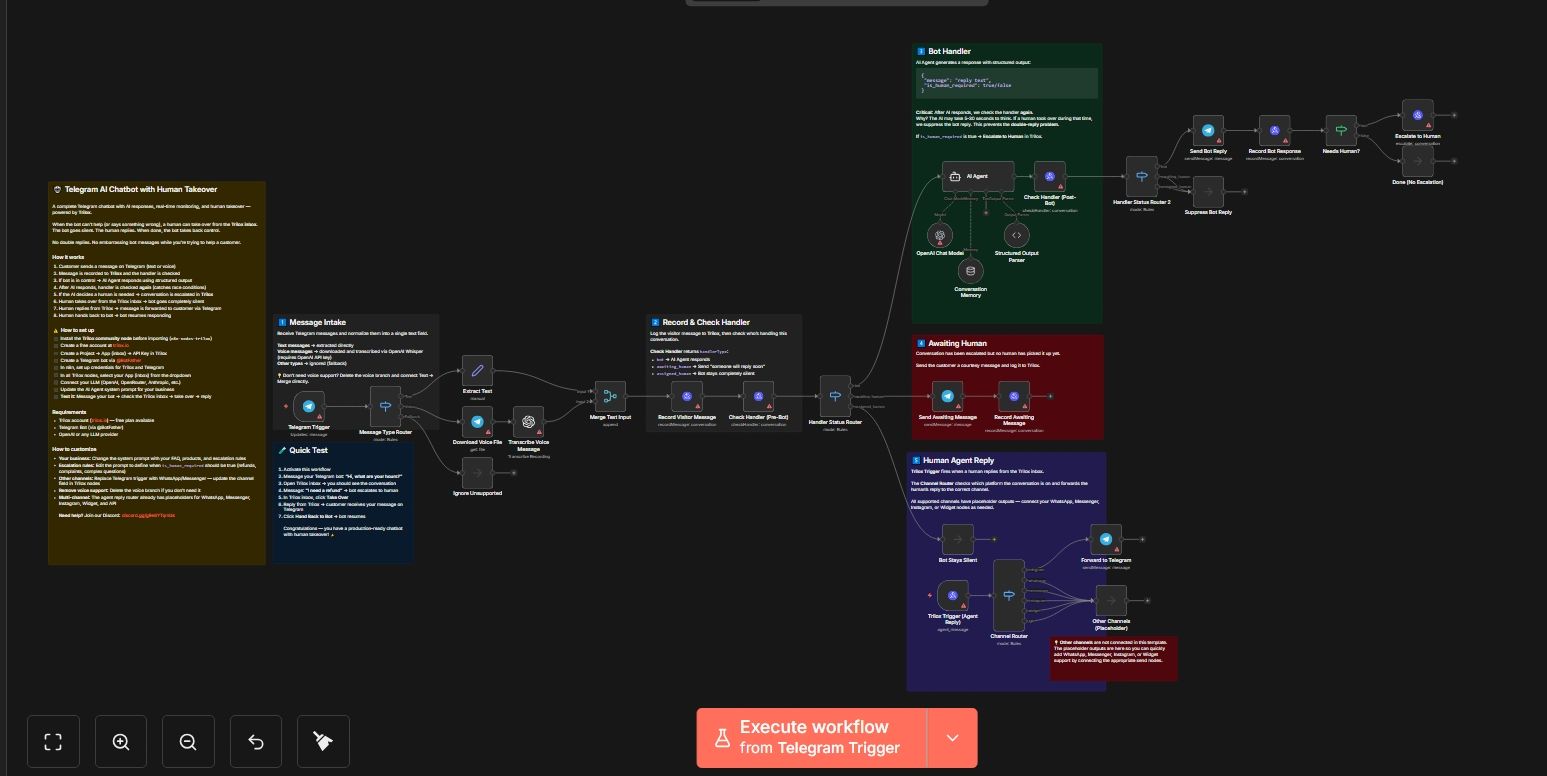
- Customer sends a message on Telegram (text or voice)
- The message is recorded to Trilox and the handler status is checked
- If the bot is in control → the AI Agent responds with a structured escalation flag
- After the AI responds, the handler is checked again — catching the race condition where a human took over while the AI was thinking
- If the AI decides a human is needed → the conversation is escalated and the customer is notified
- A human takes over from the Trilox inbox → the bot goes completely silent
- The human replies from Trilox → the reply is forwarded to Telegram
- Human hands back → bot resumes automatically
How to set up
- Install the Trilox community node (Settings → Community Nodes → Install
n8n-nodes-trilox) - Create a free account at trilox.io
- Create a Project → App (inbox) → API Key in Trilox
- Create a Telegram bot via @BotFather and get the API token
- Set up credentials for Trilox, Telegram, and OpenAI in n8n
- In all Trilox nodes, select your App from the dropdown
- Update the AI Agent system prompt with your business info and escalation rules
- Activate the workflow
Requirements
- Self-hosted n8n (community nodes required)
- Trilox account (trilox.io) — free plan available
- Telegram Bot (via @BotFather)
- OpenAI API key (or any LLM provider)
How to customize
- Escalation rules: Edit the system prompt to define when
is_human_requiredshould be true (refunds, complaints, billing) - Different LLM: Replace OpenAI with OpenRouter, Anthropic, or any compatible model
- Add channels: The Channel Router has placeholders for WhatsApp, Messenger, Instagram, Widget, and API
- Remove voice: Delete the voice branch if you don't need it
- Add knowledge base: Give the AI Agent tools (Google Docs, Notion, vector store)