Back to Templates


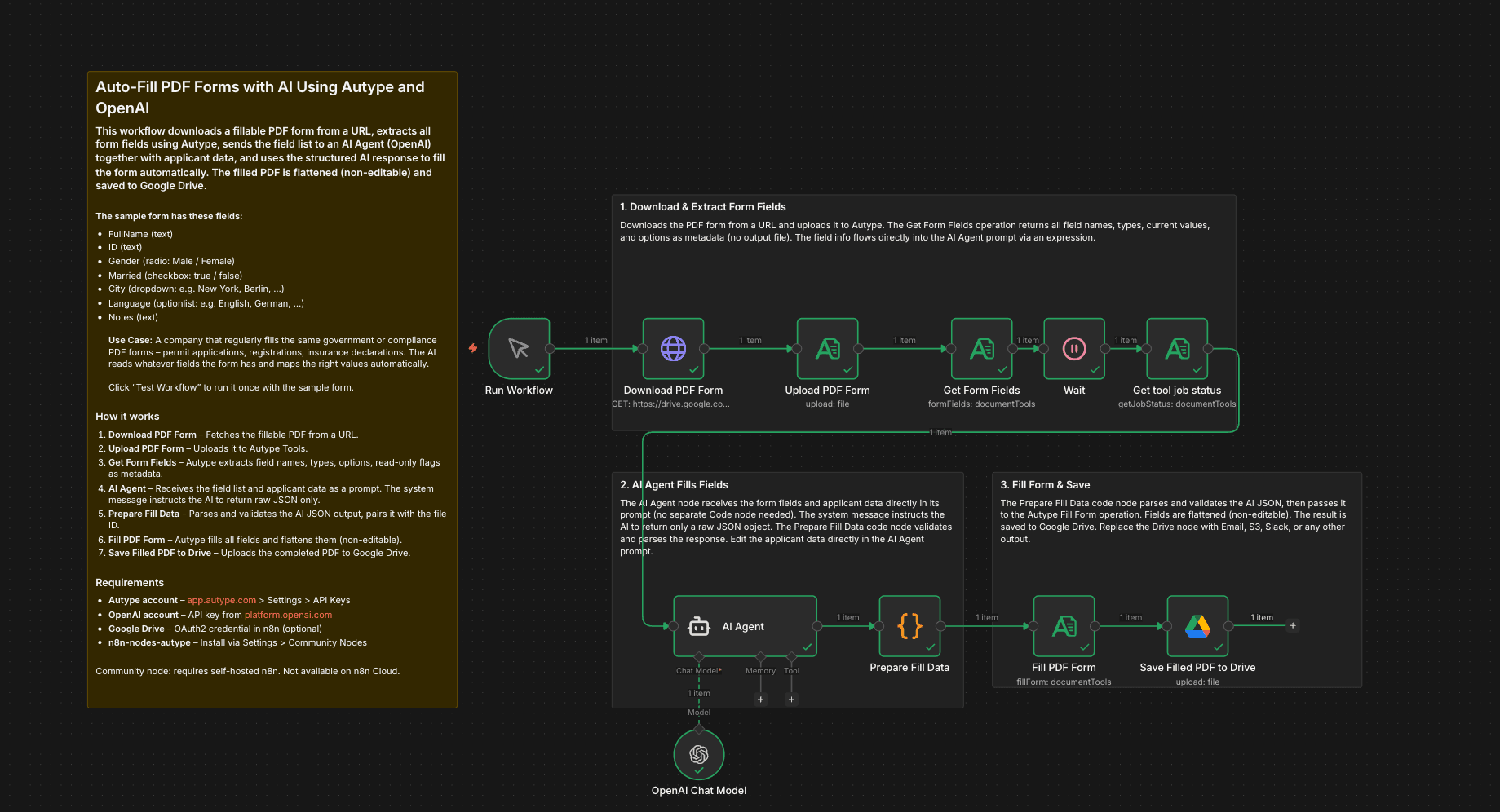
Important: This workflow uses the Autype community node and requires a self-hosted n8n instance.
This workflow downloads a fillable PDF form from a URL, extracts all form field names and types using Autype, sends the field list to an AI Agent (OpenAI) together with applicant data, and uses the AI response to fill the form automatically. The AI is instructed to return raw JSON only, and a Code node validates the response before filling. The filled PDF is flattened (non-editable) and saved to Google Drive.
Who is this for?
Companies that regularly submit the same types of PDF form applications -- permit renewals, tax filings, compliance questionnaires, insurance claims, customs declarations, or any recurring government/regulatory paperwork. Instead of manually filling the same form fields every quarter or year, the AI reads the form structure and fills it with the correct data automatically.
Concrete example: A manufacturing company must renew its operating permit every year by submitting a multi-page PDF application to the local regulatory authority. The form asks for company name, registration number, address, contact person, business type, employee count, and more. With this workflow, the company stores its data once in the AI Agent prompt, and every renewal period they simply run the workflow to get a completed, flattened PDF ready for submission.
This also works as an additional skill for an AI agent. Instead of a manual trigger, connect the workflow to a webhook or chat trigger so an agent can call it when a user asks "fill out the permit renewal form for Q2 2026."
What this workflow does
On manual trigger, the workflow fetches a fillable PDF from a URL (e.g. a government portal, internal document server, or S3 bucket). It uploads the PDF to Autype and calls Get Form Fields to extract every field name, type (text, checkbox, dropdown, radio), current value, available options, and read-only status. The field list is passed directly to an AI Agent via an inline expression (no separate prompt-building Code node needed). The AI's system message instructs it to return only raw JSON. A Code node validates and parses the response before Autype fills the form, flattens it, and the result is saved to Google Drive.
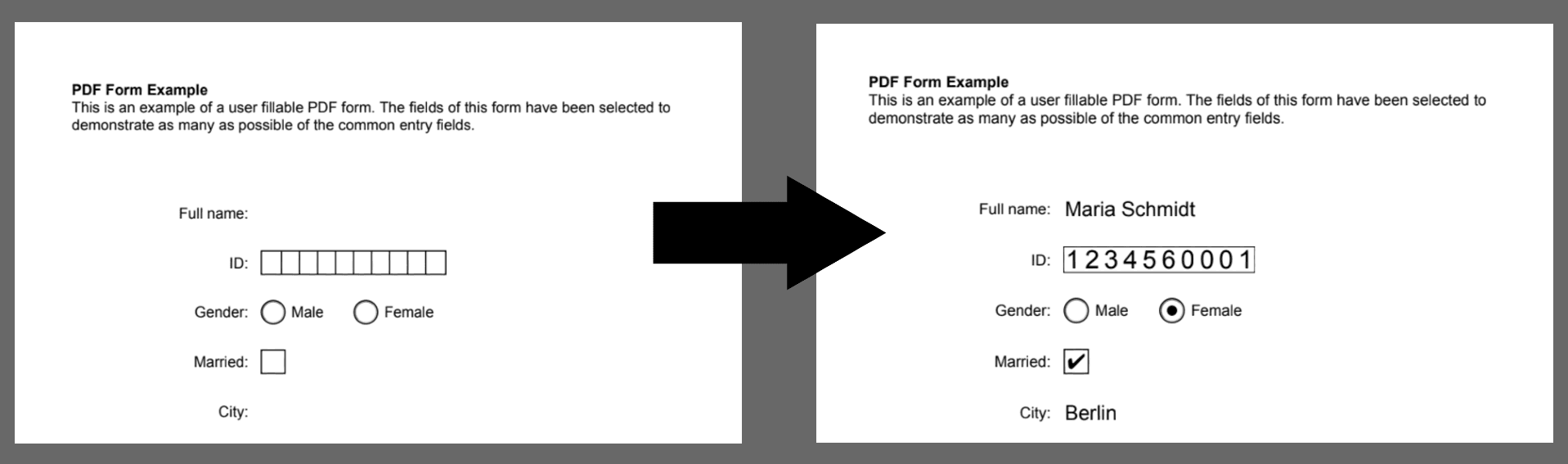
Showcase
How it works
- Run Workflow -- Manual trigger starts the pipeline.
- Download PDF Form -- An HTTP Request node fetches the fillable PDF from a URL (the sample uses a registration form with 7 fields).
- Upload PDF Form -- Uploads the PDF binary to Autype Tools to get a file ID.
- Get Form Fields -- Autype extracts all form fields and returns them as metadata. Each field includes:
name,type(text/checkbox/dropdown/radio/optionlist),value(current),options(for dropdowns/radio), andisReadOnly. No output file is created. - AI Agent -- Receives the field list and applicant data directly in its prompt via an n8n expression. The system message instructs the AI to return only a raw JSON object mapping field names to values (strings for text/dropdown/radio, booleans for checkboxes).
- Prepare Fill Data -- A Code node parses and validates the AI JSON response (strips markdown fences if present), then pairs it with the Autype file ID.
- Fill PDF Form -- Autype fills every form field with the AI-generated values. Fields are flattened (non-editable) so the output is a clean, final PDF.
- Save Filled PDF to Drive -- The completed form is uploaded to Google Drive as
filled-form-YYYY-MM-DD.pdf.
Setup
- Install the Autype community node (
n8n-nodes-autype) via Settings > Community Nodes. - Create an Autype API credential with your API key from app.autype.com. See API Keys in Settings.
- Create an OpenAI API credential with your key from platform.openai.com.
- Create a Google Drive OAuth2 credential and connect your Google account.
- Import this workflow and assign your credentials to each node (including the OpenAI Chat Model sub-node).
- The sample form URL is pre-configured. To use your own form, replace the URL in the "Download PDF Form" node.
- Edit the applicant data directly in the AI Agent node prompt (the "Prompt (User Message)" field).
- Set
YOUR_FOLDER_IDin the "Save Filled PDF to Drive" node to your target Google Drive folder. - Click Test Workflow to run the pipeline.
Note: This is a community node, so you need a self-hosted n8n instance to use community nodes.
Requirements
- Self-hosted n8n instance (community nodes are not available on n8n Cloud)
- Autype account with API key (free tier available)
n8n-nodes-autypecommunity node installed- OpenAI API key (gpt-4o-mini or any chat model)
- Google Drive account with OAuth2 credentials (optional, can replace with other output)
How to customize
- Change applicant data: Edit the prompt text directly in the "AI Agent" node. Replace the example person/company info with your own.
- Use a different AI model: Swap the OpenAI Chat Model sub-node for Anthropic Claude, Google Gemini, or any LangChain-compatible chat model.
- Connect to an AI agent: Replace the Manual Trigger with a Webhook or Chat Trigger so an AI agent can call this workflow as a tool (e.g. "fill the Q2 permit renewal form").
- Skip flattening: Set
flattentofalsein the "Fill PDF Form" node if you want the fields to remain editable after filling. - Add watermark: Insert an Autype Watermark step after Fill Form to stamp "DRAFT" or "SUBMITTED" on every page before saving.
- Add password protection: Insert an Autype Protect step after filling to encrypt the PDF before uploading to Drive.
- Change output destination: Replace the Google Drive node with Email (SMTP), S3, Slack, or any other n8n output node.
- Pull data from a database: Instead of hardcoding data in the AI Agent prompt, query a database (Postgres, MySQL, Airtable) or CRM (HubSpot, Salesforce) to dynamically fill different forms for different entities.