Back to Templates


Manage AI coding sessions from Matrix with YouTrack and GitLab
Who is this for
Development teams using Claude Code who want a chat-ops interface for
project management. Instead of SSH-ing into a server to run Claude,
your whole team interacts with it through a Matrix chat room — with
issue tracking and CI/CD pipeline visibility built in.
What it does
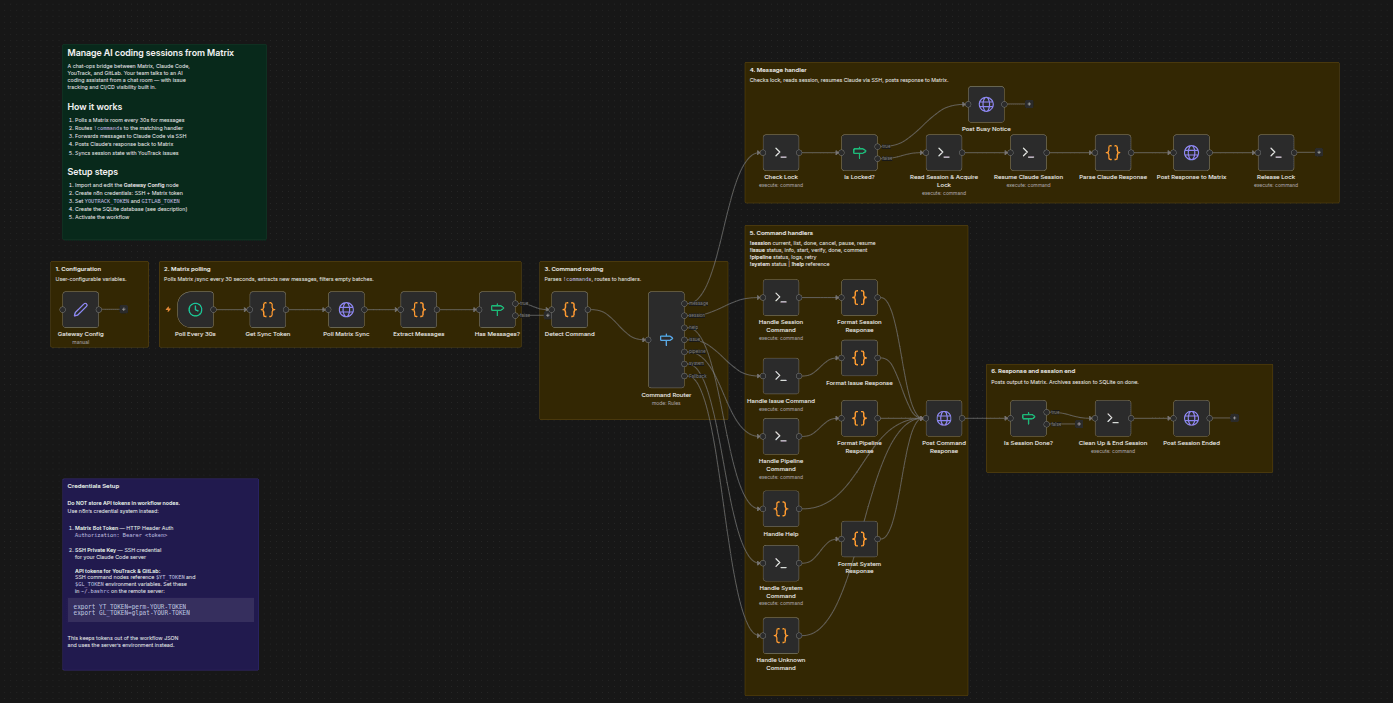
- Polls a Matrix room every 30 seconds and routes commands to handlers
- Forwards messages to Claude Code sessions via SSH, posts responses back
- Manages multiple concurrent sessions — start, pause, resume, switch, end
- Updates YouTrack issues directly from chat (change state, post comments, query status)
- Fetches GitLab CI pipeline status and logs, retries failed pipelines
- Reports server load and Claude process status
- Tracks sessions in SQLite with lock-based concurrency and cooldown guards
Template Image
How it works
The workflow polls a Matrix room for new messages. A command router
parses !commands and dispatches them to the right handler:
- Regular messages resume an active Claude Code session and post the response
- !session — manage sessions (current, list, done, cancel, pause, resume, switch, log)
- !issue — update YouTrack issues (status, info, start, stop, verify, done, close, comment)
- !pipeline — fetch GitLab CI pipeline status and logs, retry failed pipelines
- !system — report server load and running processes
- !help — show command reference
Requirements
- Matrix homeserver with a bot account (E2EE must be disabled —
n8n cannot decrypt Matrix messages) - YouTrack instance with API token
- GitLab instance with API token
- Linux server with Claude Code CLI installed, accessible via SSH
- n8n self-hosted with SSH private key credentials configured
This is a self-hosted template. It requires your own infrastructure —
it will not run on n8n Cloud without a server accessible via SSH.
How to set up
- Import the workflow into n8n
- Edit the Gateway Config Set node with your URLs and paths
- Set
YOUTRACK_TOKENandGITLAB_TOKENas environment variables
on your server (not in the workflow) - Create n8n credentials: SSH Private Key and HTTP Header Auth
(Matrix bot token asAuthorization: Bearer <token>) - Create the SQLite database on your server:
CREATE TABLE sessions (
  issue_id TEXT PRIMARY KEY, issue_title TEXT,
  session_id TEXT, started_at TEXT, last_active TEXT,
  message_count INTEGER DEFAULT 0, paused INTEGER DEFAULT 0,
  is_current INTEGER DEFAULT 0
);
CREATE TABLE queue (
  id INTEGER PRIMARY KEY AUTOINCREMENT,
  issue_id TEXT, message TEXT, queued_at TEXT
);
CREATE TABLE session_log (
  id INTEGER PRIMARY KEY AUTOINCREMENT,
  issue_id TEXT, issue_title TEXT, session_id TEXT,
  started_at TEXT, ended_at TEXT,
  message_count INTEGER, outcome TEXT
);
- Activate the workflow
How to customize
- Add commands — add a case to the Command Router Switch node
- Change polling interval — edit the Schedule Trigger node
- Swap issue tracker — replace YouTrack API calls with Jira or Linear
- Swap chat platform — replace Matrix HTTP nodes with Slack or Discord
- Add pipeline detail — extend Handle Pipeline to fetch individual job logs