Back to Templates


What Is This?
This workflow is an automated invoice payment tracking and vindication system that monitors unpaid and overdue invoices stored in NocoDB, then sends escalating reminders to clients based on configurable time thresholds. The system handles three escalation levels: friendly payment reminders before/at due date, formal warning notices for overdue invoices, and legal action notifications for severely overdue accounts.
It works with any accounting system that can populate a NocoDB database, making it ideal for businesses using custom invoicing systems, international accounting software, or multiple invoice sources.
Who Is It For?
Designed for small to medium-sized businesses, IT service providers, consulting agencies, and accounting departments that need professional payment enforcement without expensive debt collection services. This workflow is particularly valuable for companies experiencing cash flow challenges due to late-paying clients.
B2B service providers, software development agencies, consultancies, and freelancers managing multiple client invoices will benefit from automated, multi-channel payment reminders that maintain professional relationships while firmly enforcing payment terms.
Whether you're tracking 5 high-value contracts or managing 200+ monthly invoices, this automation ensures no payment deadline slips through the cracks. It's especially useful for businesses operating internationally or using accounting systems without built-in reminder features.
How Does It Work?
This comprehensive invoice vindication automation consists of four main stages:
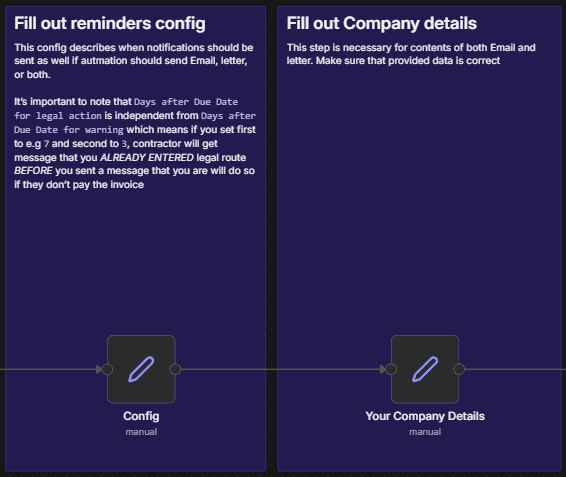
1. Configuration & Company Details Setup
Defines critical parameters including escalation timeframes (Days before Due Date for reminder, Days after Due Date for warning, Days after Due Date for Legal action), and toggles for notification channels (Send Email, Send Physical Letter). The workflow also captures complete company information for professional correspondence including banking details, tax identification numbers, and contact information.
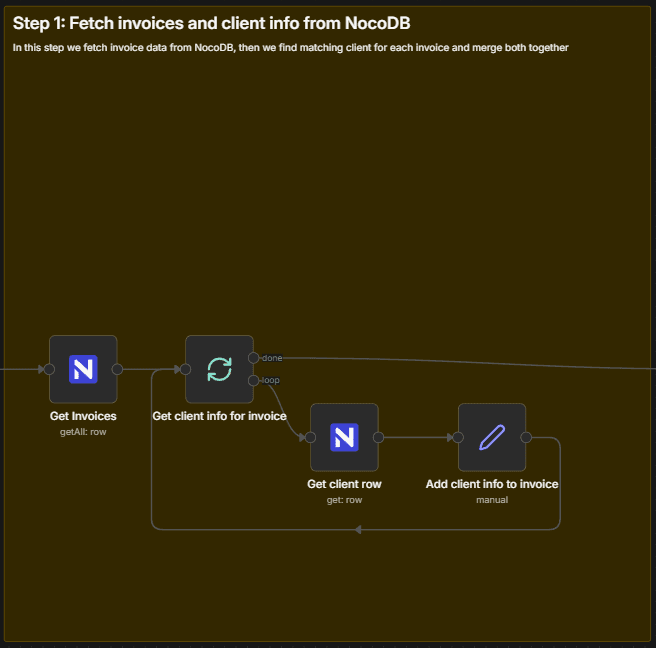
2. Invoice & Client Data Retrieval
Connects to NocoDB to fetch all invoices with their associated client information. The workflow uses a Split in Batches node to process each invoice individually, retrieving complete client details (name, email, full address) from the linked Clients table. This two-step fetch ensures all necessary data is available for personalized communications.
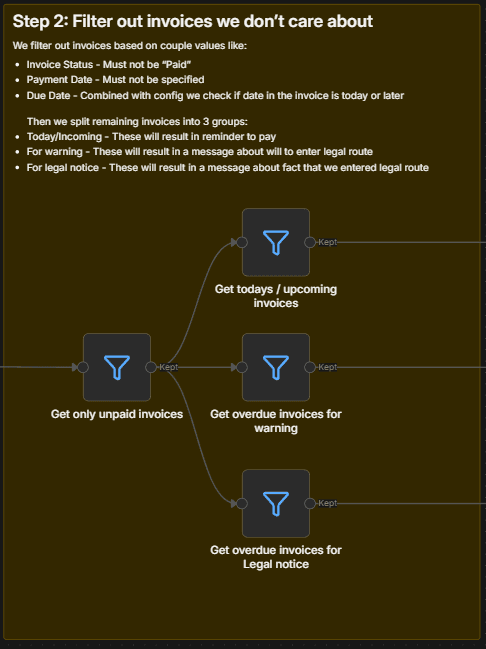
3. Intelligent Filtering & Categorization
Invoices are filtered to remove already-paid invoices (checking both Invoice Status ≠ "Paid" and Payment Date = empty), then categorized into three escalation groups:
- Today/Upcoming Invoices: Due date is today OR X days away → Sends friendly payment reminder
- Overdue for Warning: Exactly Y days past due date → Sends formal warning about potential legal action
- Overdue for Legal Notice: Exactly Z days past due date → Sends notice of commenced legal proceedings
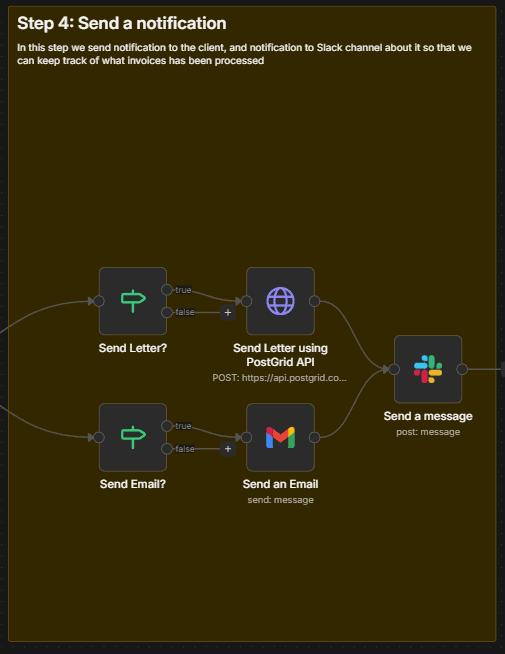
4. Multi-Channel Notification Dispatch
For each escalation level, the workflow generates professionally formatted HTML content with complete invoice details, payment instructions, and appropriate urgency levels. Notifications are dispatched via:
- Email (Gmail): Professional HTML emails with company branding
- Physical Mail (PostGrid): Printed letters delivered via postal service for serious escalations
- Slack: Internal team notifications for tracking sent reminders
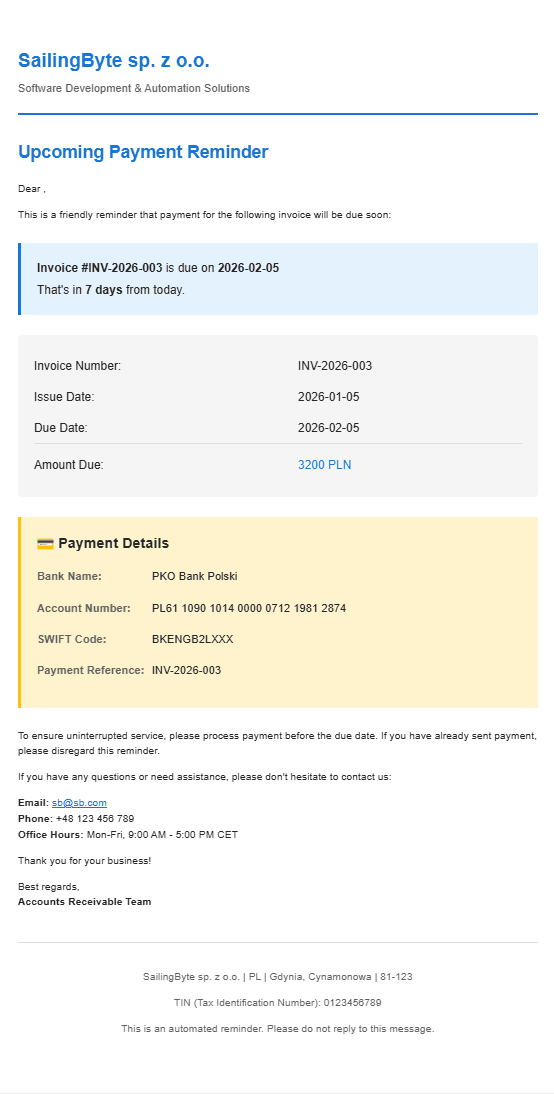
Each notification includes invoice number, amounts, due dates, payment details (bank account, SWIFT code), and clear call-to-action based on escalation level.
How To Set It Up?
Prerequisites:
- An active N8N account or self-hosted instance
- A NocoDB instance (hosted at your domain or using NocoDB Cloud)
- A Slack workspace with bot permissions
- (Optional) Gmail account configured for sending emails
- (Optional) PostGrid account for physical mail delivery
Step 1: Create NocoDB Tables
Execute the "Create Tables" manual trigger to automatically create two tables in your NocoDB base:
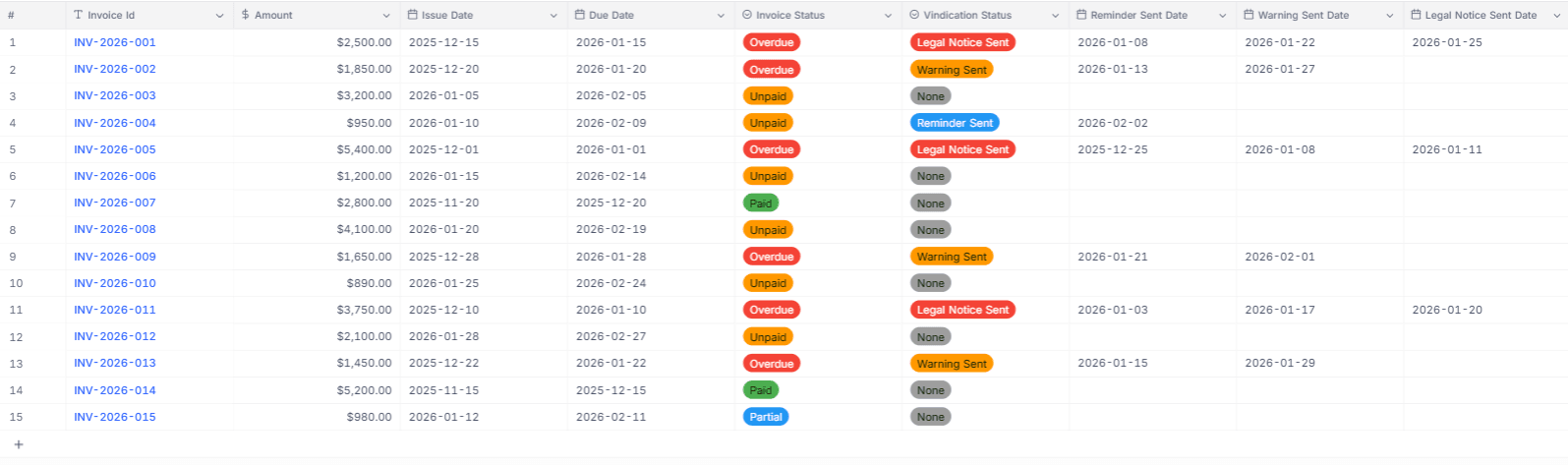
Invoices Table with fields:
- Invoice Id (SingleLineText)
- Amount (Currency, PLN)
- Issue Date (Date)
- Due Date (Date)
- Invoice Status (SingleSelect: Unpaid, Partial, Paid, Overdue)
- Vindication Status (SingleSelect: None, Reminder Sent, Warning Sent, Legal Notice Sent)
- Reminder Sent Date, Warning Sent Date, Legal Notice Sent Date (Date fields)
- Payment Date (Date)
Clients Table with fields:
- Name (SingleLineText)
- Email (Email)
- Country Code, Province, City, Postal Code, Address (SingleLineText)
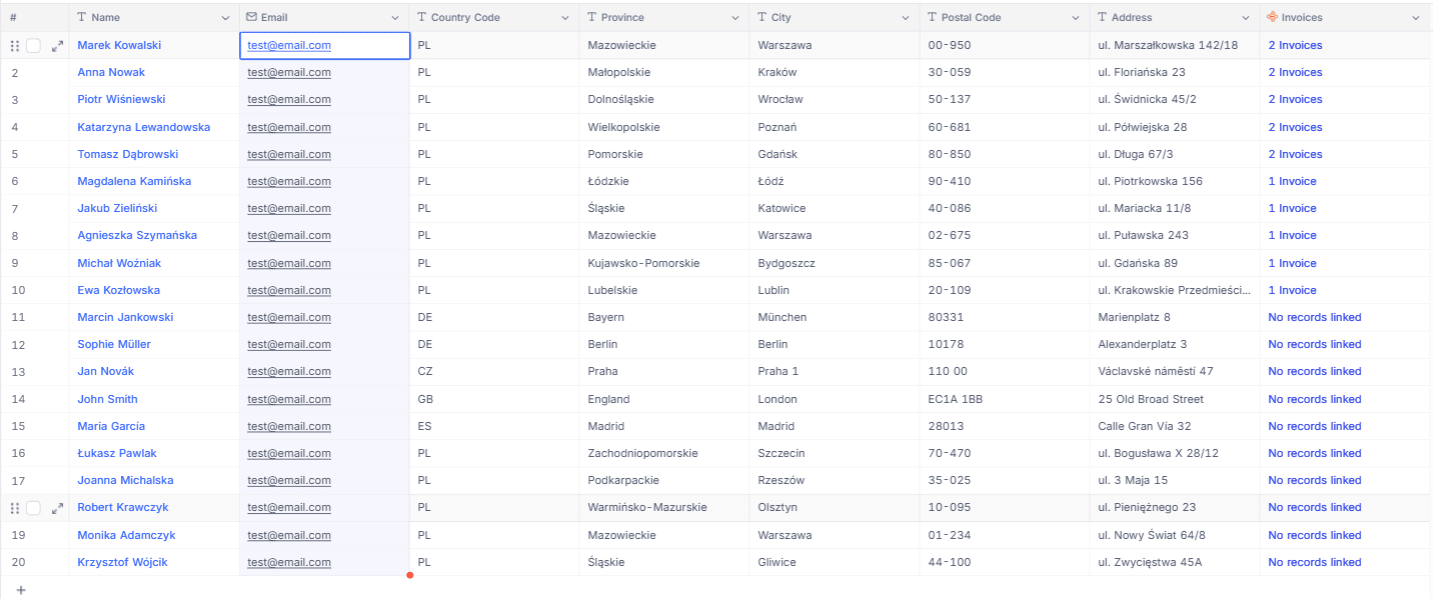
The workflow automatically creates a one-to-many relationship between Clients and Invoices.
Step 2: Configure NocoDB Connection
In the "NocoDB Config" node:
- Base ID: Your NocoDB base identifier (e.g.,
pksfpoc943gwhvy) - NocoDB Url: Your NocoDB instance URL (e.g.,
https://noco.sbyte.eu/)
Update all NocoDB credentials to point to your instance using the "NocoDB Token" authentication.
Step 3: Set Escalation Timing
In the "Config" node, configure:
- Days before Due Date for reminder: How early to send friendly reminders (default: 7 days before)
- Days after Due Date for warning: When to escalate to formal warning (default: 7 days overdue)
- Days after Due Date for Legal action: When to send legal notices (default: 10 days overdue)
Critical: Ensure "Days after Due Date for Legal action" > "Days after Due Date for warning" to maintain proper escalation sequence. Setting legal action earlier than warning will confuse clients.
Step 4: Configure Notification Channels
In the "Config" node:
- Send Email: Toggle to enable/disable Gmail notifications
- Send Physical Letter: Toggle to enable/disable PostGrid physical mail
Step 5: Add Your Company Details
In the "Your Company Details" node, provide:
- Company Name, Email, Phone
- Full address (Country Code, City, Street, Postal Code)
- Banking information (Bank Name, Bank Account Number, SWIFT Code)
- Tax Identification Number (TIN)
This information appears in all correspondence and legal notices.
Step 6: Configure Credentials
Set up the following credentials:
- NocoDB API Token: From your NocoDB account settings
- Gmail OAuth2: For email delivery (if Send Email = true)
- PostGrid API: For physical letter delivery (if Send Physical Letter = true)
- Slack OAuth2: For internal team notifications
Step 7: Customize Slack Channel
In the "Send a message" node, update the Slack channel ID to your desired notification channel.
Step 8: Schedule Execution
The workflow runs automatically daily at 7:00 AM via the "Run daily" trigger node. Adjust timing in the Schedule Trigger node as needed. For testing, execute manually using the "Execute workflow" button.
What's More?
Professional HTML Email Templates:
Three distinct HTML email templates provide escalating urgency levels while maintaining professional communication standards. Each template includes:
- Company branding and letterhead
- Clear invoice details with formatting
- Payment instructions with bank details
- Appropriate tone for escalation level (friendly → formal → legal)
- Contact information for questions
Smart Date Calculations:
The workflow uses N8N's DateTime functions to calculate:
- Days until due date for upcoming invoices
- Days overdue for late payments
- Exact matching for escalation thresholds (uses
equalsoperator, not ranges)
This ensures invoices are processed exactly once at each escalation stage, preventing duplicate notifications.
Flexible Data Model:
The NocoDB schema supports tracking:
- Multiple vindication stages with dedicated date fields
- Invoice status progression (Unpaid → Partial → Overdue → Paid)
- Vindication status history (None → Reminder Sent → Warning Sent → Legal Notice Sent)
- Payment reconciliation via Payment Date field
Multi-Format Address Handling:
The workflow correctly formats addresses for:
- Email recipients (standard format)
- PostGrid API (structured JSON with country codes, provinces, postal codes)
- HTML templates (human-readable format)
Batch Processing with Error Isolation:
The Split in Batches node processes invoices individually, ensuring one failed notification (e.g., invalid email address) doesn't block processing of remaining invoices. Each invoice proceeds through the workflow independently.
Conditional Notification Routing:
IF nodes check configuration flags before sending notifications, allowing granular control:
- Send only emails for low-cost operations
- Send only physical letters for serious escalations
- Send both for maximum impact
- Disable specific channels temporarily without modifying workflow
Slack Notification Intelligence:
Slack messages include structured blocks showing:
- Email subject (escalation type)
- Invoice number and amount
- Contractor name
- Days overdue calculation
- Payment deadline and issue date
This provides at-a-glance visibility into which invoices triggered notifications and why.
Table Creation Automation:
Rather than requiring manual NocoDB table setup, the workflow includes HTTP Request nodes that programmatically create tables with exact field types, validation rules, and relationships using NocoDB's Meta API. This ensures consistent schema across deployments and eliminates manual configuration errors.
Currency Support:
While defaulting to PLN (Polish Złoty), the Amount field uses NocoDB's Currency type, which can be easily changed to EUR, USD, GBP, or 150+ other currencies via the table schema without modifying workflow logic.
Thank You, Perfect!
Visit my profile for other free business automations. And if you're looking for dedicated software development or custom n8n workflow solutions, don't hesitate to reach out at [email protected] or on sailingbyte.com!