Back to Templates



💥 Generate AI Music & Publish to YouTube Automatically with Blotato
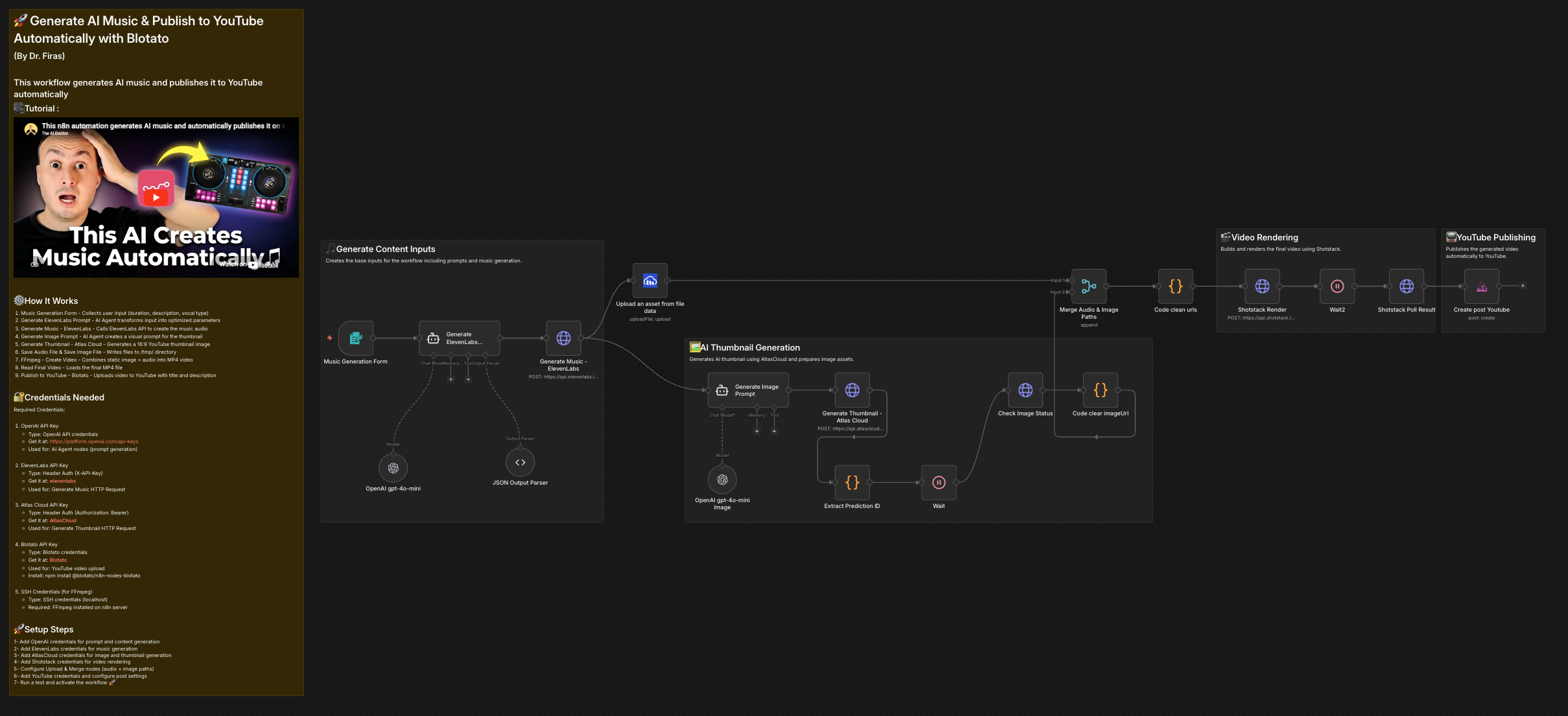
This workflow automatically generates AI music, creates a thumbnail, converts everything into a video, and publishes it directly to YouTube — fully automated.
Perfect for building faceless YouTube music channels, AI content automation, or passive content generation pipelines.
Who is this for?
This template is ideal for:
- YouTube creators building AI music channels
- Content creators creating faceless videos
- Automation enthusiasts using n8n for content pipelines
- Agencies generating bulk YouTube content
- Anyone wanting to automate music creation and publishing
Whether you're creating lofi music, ambient tracks, meditation sounds, or background music, this workflow removes manual work entirely.
What problem is this workflow solving?
Creating AI music videos typically involves multiple manual steps:
- Generating music
- Creating thumbnails
- Converting audio into video
- Uploading to YouTube
- Writing titles and metadata
This process is time-consuming and repetitive.
This workflow automates everything into a single end-to-end pipeline, allowing you to:
- Generate unlimited AI music
- Automatically create thumbnails
- Convert audio into video
- Publish directly to YouTube
What this workflow does
This workflow performs the following steps:
- User submits a music request via form
- AI generates an optimized music prompt
- ElevenLabs generates AI music
- AI generates thumbnail prompt
- Atlas Cloud generates thumbnail image
- Cloudinary uploads generated assets
- Shotstack creates video (image + audio)
- Blotato uploads video to YouTube automatically
- SEO-optimized YouTube title is generated automatically
Final result:
AI-generated music video automatically published to YouTube
The entire process runs fully automated.
Setup
To use this workflow, configure the following credentials:
Required APIs
- OpenAI API Key — Prompt generation
- Elevenlabs API Key — Music generation
- AtlasCloud API Key — Thumbnail generation
- Cloudinary Account — Media hosting
- Shotstack API Key — Video creation
- Blotato API Key — YouTube publishing
Community Node Requirement
This workflow uses the Blotato community node.
🎥 Watch This Tutorial
👋 Need help or want to customize this?
📩 Contact: LinkedIn
📺 YouTube: @DRFIRASS
🚀 Workshops: Mes Ateliers n8n
Need help customizing?
Contact me for consulting and support : Linkedin / Youtube / 🚀 Mes Ateliers n8n