Back to Templates



Description
This workflow is designed for B2B/SaaS teams who want to secure renewals before it’s too late.
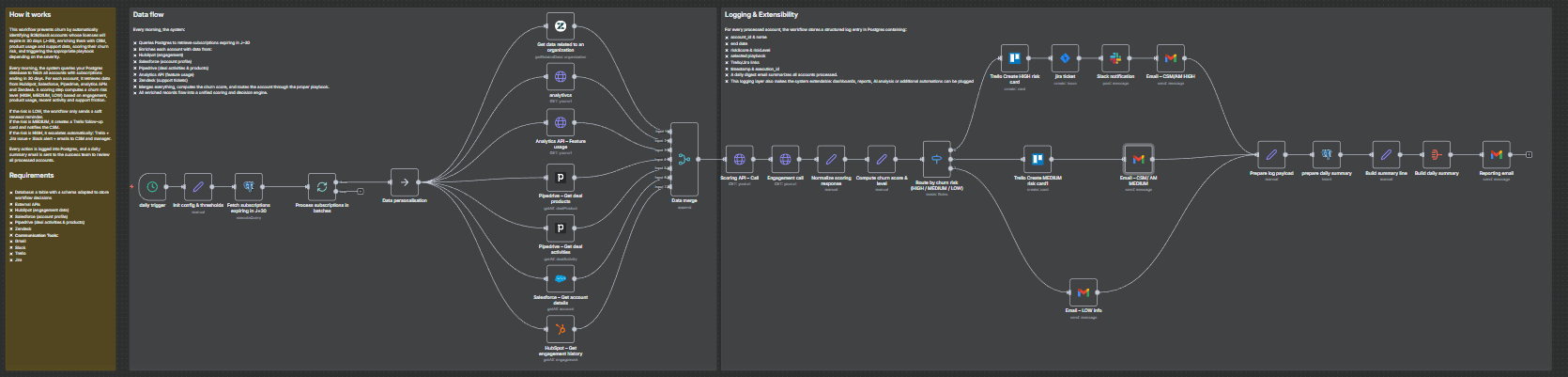
It runs every day, identifies all accounts whose licenses are up for renewal in J–30, enriches them with CRM, product usage and support data, computes an internal churn risk level, and then triggers the appropriate playbook:
- HIGH risk → full escalation (tasks, alerts, emails)
- MEDIUM risk → proactive follow-up by Customer Success
- LOW risk → light renewal touchpoint / monitoring
Everything is logged into a database table so that you can build dashboards, run analysis, or plug additional automations on top.
How it works
-
Daily detection (J–30 renewals)
A scheduled trigger runs every morning and queries your database (Postgres / Supabase) to fetch all active subscriptions expiring in 30 days. Each row includes the account identifier, name, renewal date and basic commercial data. -
Data enrichment across tools
For each account, the workflow calls several business systems to collect context:- HubSpot → engagement history
- Salesforce → account profile and segment
- Pipedrive → deal activities and associated products
- Analytics API → product feature usage and activity trends
- Zendesk → recent support tickets and potential friction signals
All of this is merged into a single, unified item.
-
Churn scoring & routing
An internal scoring step evaluates the risk for each account based on multiple signals (engagement, usage, support, timing).
The workflow then categorizes each account into one of three risk levels:- HIGH – strong churn signals → needs immediate attention
- MEDIUM – some warning signs → needs proactive follow-up
- LOW – looks healthy → light renewal reminder
A
Switchnode routes each account to the relevant playbook. -
Automated playbooks
-
🔴 HIGH risk
- Create a Trello card on a dedicated “High-Risk Renewals” board/list
- Create a Jira ticket for the CS / AM team
- Send a Slack alert in a designated channel
- Send a detailed email to the CSM and/or account manager
-
🟠 MEDIUM risk
- Create a Trello card in a “Renewals – Follow-up” list
- Send a contextual email to the CSM to recommend a proactive check-in
-
🟢 LOW risk
- Send a soft renewal email / internal note to keep the account on the radar
-
-
Logging & daily reporting
For every processed account, the workflow prepares a structured log record (account, renewal date, risk level, basic context).
A Postgres node is used to insert the data into achurn_logstable.At the end of each run, all processed accounts are aggregated and a daily summary email is sent (for example to the Customer Success leadership team), listing the renewals and their risk levels.
Requirements
-
Database
- A table named
churn_logs(or equivalent) to store workflow decisions and history.
Example fields:account_id,account_name,end_date,riskScore,riskLevel,playbook,trello_link,jira_link,timestamp.
- A table named
-
External APIs
- HubSpot (engagement data)
- Salesforce (account profile)
- Pipedrive (deals & products)
- Zendesk (support tickets)
- Optional: product analytics API for usage metrics
-
Communication & task tools
- Gmail (emails to CSM / AM / summary recipients)
- Slack (alert channel for high-risk cases)
- Trello (task creation for CS follow-up)
- Jira (escalation tickets for high-risk renewals)
-
Configuration variables
- Thresholds are configured in the
Init config & thresholdsnode:days_before_renewalchurn_threshold_highchurn_threshold_medium
- These parameters let you adapt the detection window and risk sensitivity to your own business rules.
- Thresholds are configured in the
Typical use cases
- Customer Success teams who want a daily churn watchlist without exporting spreadsheets.
- RevOps teams looking to standardize renewal playbooks across tools.
- SaaS companies who need to prioritize renewals based on real risk signals rather than gut feeling.
- Product-led organizations that want to combine usage data + CRM + support into one automated process.
Tutorial video
Watch the Youtube Tutorial video
About me :
I’m Yassin a Project & Product Manager Scaling tech products with data-driven project management.
📬 Feel free to connect with me on Linkedin