Back to Templates



What Is This?
This workflow is an automated system that tracks End-of-Life (EOL) dates for software and technologies used across your projects. It eliminates the need to manually monitor EOL dates in spreadsheets or calendars by automatically fetching the latest EOL information and sending Slack notifications when software versions are approaching their end of support, end of life, or when new subversions are released.
Who Is It For?
Designed for DevOps teams, IT managers, project managers, CTOs, and technical leads responsible for maintaining software infrastructure. This workflow empowers anyone who needs to ensure their projects stay secure and compliant by using supported software versions.
Development agencies managing multiple client projects, internal IT teams overseeing infrastructure maintenance, and compliance officers tracking software support lifecycles will all find this solution invaluable. By automatically monitoring EOL dates from endoflife.date and cross-referencing them with your project inventory, the workflow ensures you never miss critical upgrade windows.
Whether you manage a handful of internal applications or oversee dozens of client projects with varied technology stacks, this automated pipeline delivers timely, actionable alerts without manual date tracking.
How Does It Work?
This end-to-end EOL monitoring automation consists of five main stages:
1. Software Inventory Collection
Retrieves your list of software to monitor from the NocoDB EOL Software table, then processes each software individually through the pipeline.
2. EOL Data Fetching
Connects to the free endoflife.date API to fetch comprehensive EOL information for each software, including version cycles, latest subversions, release dates, support end dates, and EOL dates for over 400 products.
3. Data Normalization & Storage
Renames API fields to human-readable formats, converts boolean values to proper nulls, and intelligently updates or creates records in the EOL Dates table based on existing data.
4. Project Analysis
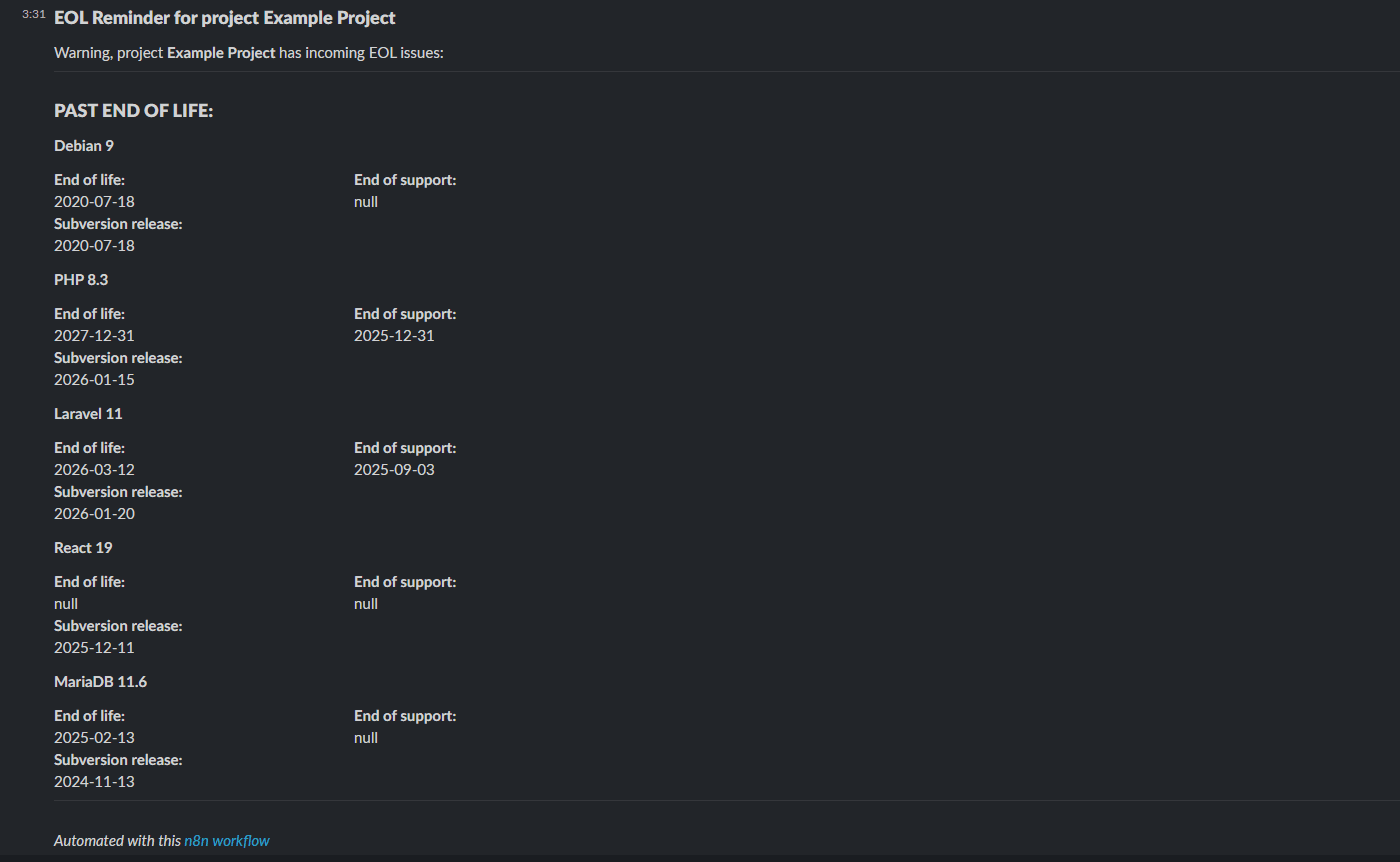
Uses JavaScript to analyze all projects and their associated software versions, categorizing them into three priority groups: Past EOL (already end-of-life), EOL Today (ending today), and EOL in X days (approaching within configured threshold).
5. Intelligent Notifications
Filters out projects without EOL concerns and sends beautifully formatted Slack messages to your designated channel, clearly organizing alerts by severity with complete version and date information.
How To Set It Up?
Prerequisites:
- An active n8n account or self-hosted instance
- A NocoDB account with API access, might be self-hosted
- A Slack workspace with appropriate permissions
Required NocoDB Tables:
You need to create three tables with specific schemas. Luckily, our workflow automates the set up as much as possible to provide better experience.
EOL Software Table (manually populated):
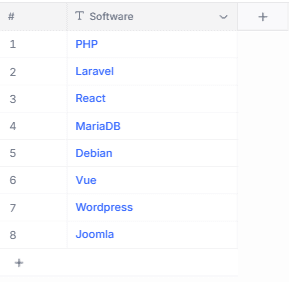
Title: Single line text - must use valid software identifiers from endoflife.date
EOL Dates Table (automatically populated):
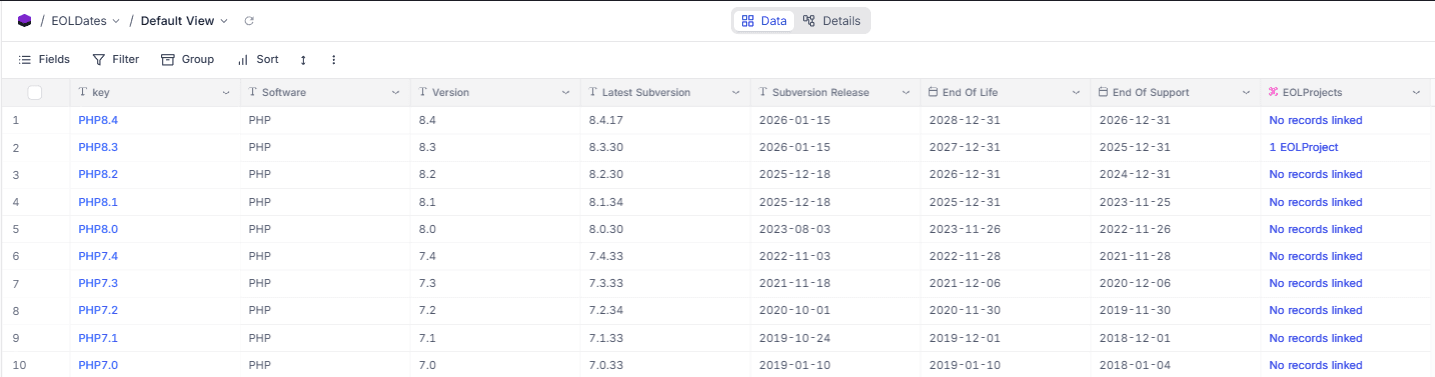
key: Single line textSoftware: Single line textVersion: Single line textLatest Subversion: Single line textSubversion Release: Date fieldEnd Of Life: Date fieldEnd Of Support: Date fieldLong Term Support: Checkbox
EOL Projects Table (manually populated):
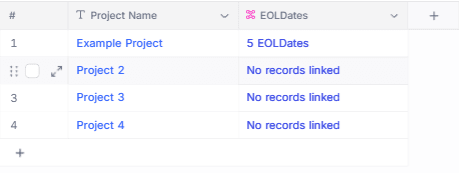
Project Name: Single line textEOLDates: Link field - Many-to-Many relationship to EOL Dates table
Configuration:
In the "Config" node, set Days before EOL to your desired notification threshold (default: 31 days).
Credentials Setup:
- Configure NocoDB API token in the NocoDB nodes
- Set up Slack OAuth2 credentials in the "Send a message" node
- Update the Slack channel ID to your desired notification channel
Scheduling:
The workflow runs automatically daily at 7:00 AM via the Schedule Trigger node. For initial setup, run it manually by pressing "Execute workflow" to populate the EOL Dates table.
Initial Data Entry:
- First run: Manually populate the EOL Software table with software you want to track
- Execute the workflow manually to populate the EOL Dates table
- Populate the EOL Projects table by linking your project names to the relevant software versions from EOL Dates
- The workflow will now automatically monitor and notify you daily
What's More?
Rate Limiting Protection:
The workflow includes a Wait node between API calls to respect endoflife.date's rate limits, ensuring reliable long-term operation.
Smart Update Logic:
The workflow intelligently checks if EOL data already exists before deciding whether to update existing records or insert new ones, preventing duplicates and maintaining data integrity.
Flexible Alerting:
Configure your notification window from 1 to any number of days before EOL events, adapting to your team's upgrade planning cycles.
Thank You, Perfect!
Visit my profile for other free business automations. And if you're looking for dedicated software development or custom n8n workflow solutions, don't hesitate to reach out at [email protected] or on sailingbyte.com!