Back to Templates



Overdue Invoice Payment Reminder Workflow Documentation
What Is This?
This workflow is an automated invoice payment tracking and reminder system for the Polish accounting service iFirma.pl. It monitors unpaid and overdue invoices, then automatically sends escalating reminders to contractors based on configurable time thresholds. The system handles three escalation levels: payment reminders before/at due date, pre-trial summons, and formal legal action notices.
Who Is It For?
Designed for Polish businesses, accounting departments, and financial controllers using iFirma.pl for invoice management. This workflow is essential for companies struggling with late payments and cash flow management, particularly those needing to enforce payment terms professionally and systematically.
B2B service providers, consultancies, software development agencies, and any business issuing invoices to other companies will benefit from automated payment enforcement. The workflow eliminates manual tracking of payment deadlines and ensures consistent, professional follow-up with delinquent clients.
Whether managing a handful of high-value invoices or processing hundreds of transactions monthly, this automation delivers timely notifications without manual calendar monitoring or spreadsheet management.
How Does It Work?
This end-to-end invoice monitoring automation consists of four main stages:
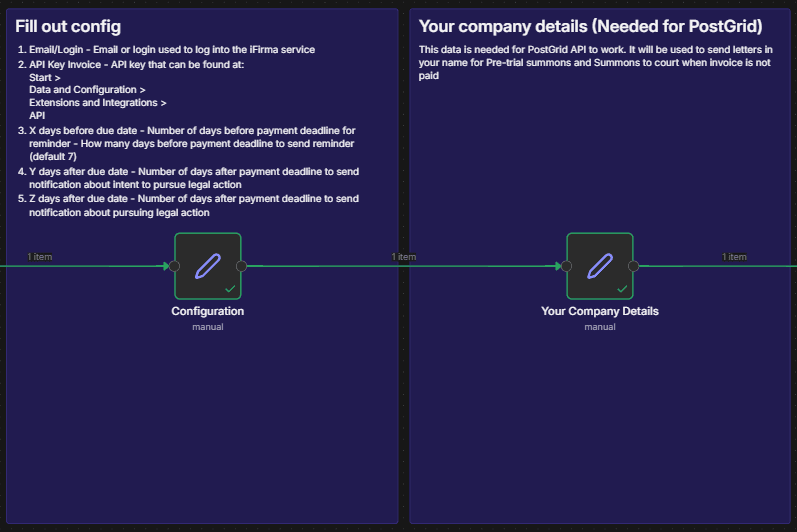
1. Configuration & Authentication
Sets up user credentials (email/login, API key), defines escalation timeframes (X days before due date, Y days after, Z days after), and prepares company details for legal correspondence. The workflow then constructs a cryptographic authentication signature using HMAC-SHA1 algorithm, which iFirma requires for API access.
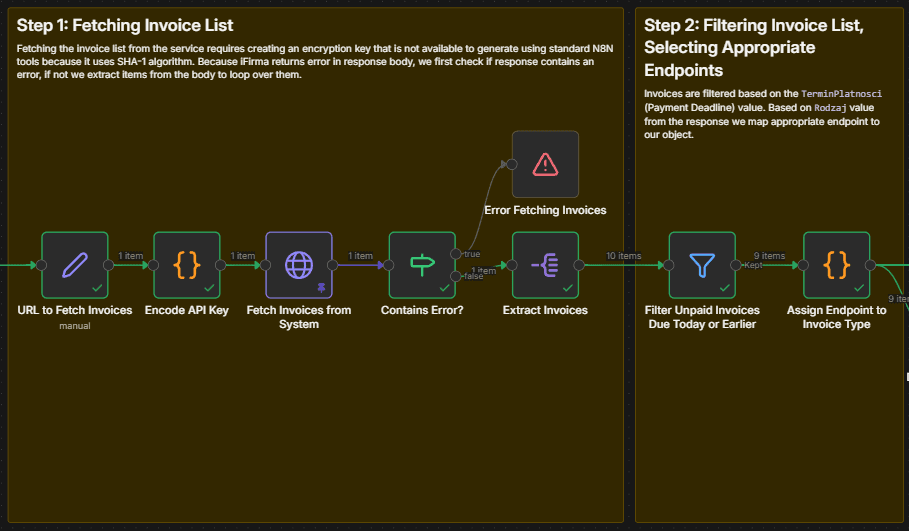
2. Invoice Retrieval & Filtering
Connects to iFirma API to fetch all unpaid, partially paid, and overdue invoices, then filters them based on payment deadline dates. Only invoices that are either overdue or approaching their due date (within X days) proceed to the next stage.
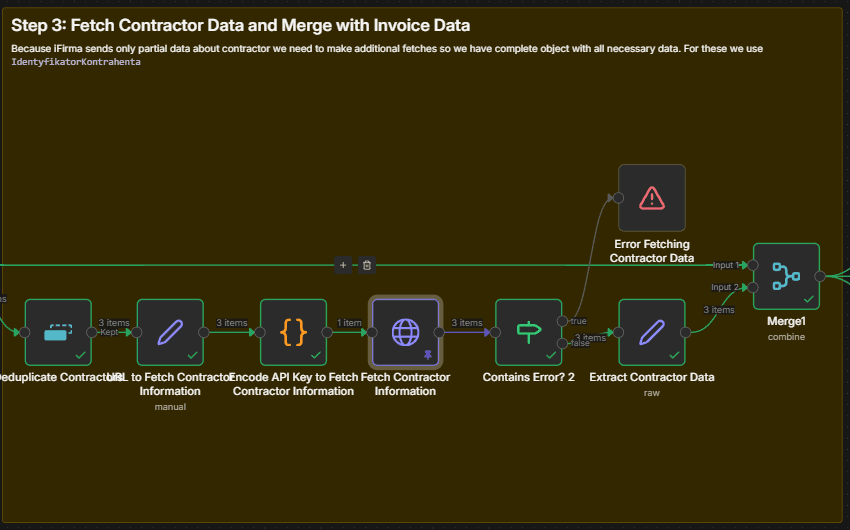
3. Contractor Data Enrichment
For each qualifying invoice, the workflow fetches complete contractor information from iFirma (since invoice records contain only partial contractor data). This includes email addresses, company names, and addresses needed for sending reminders. The workflow deduplicates contractors to avoid redundant API calls.
4. Escalation Logic & Notification Dispatch
Invoices are categorized into three groups based on how overdue they are:
- Payment Reminder: Due today or X days before due date → Sends reminder via iFirma's built-in notification system
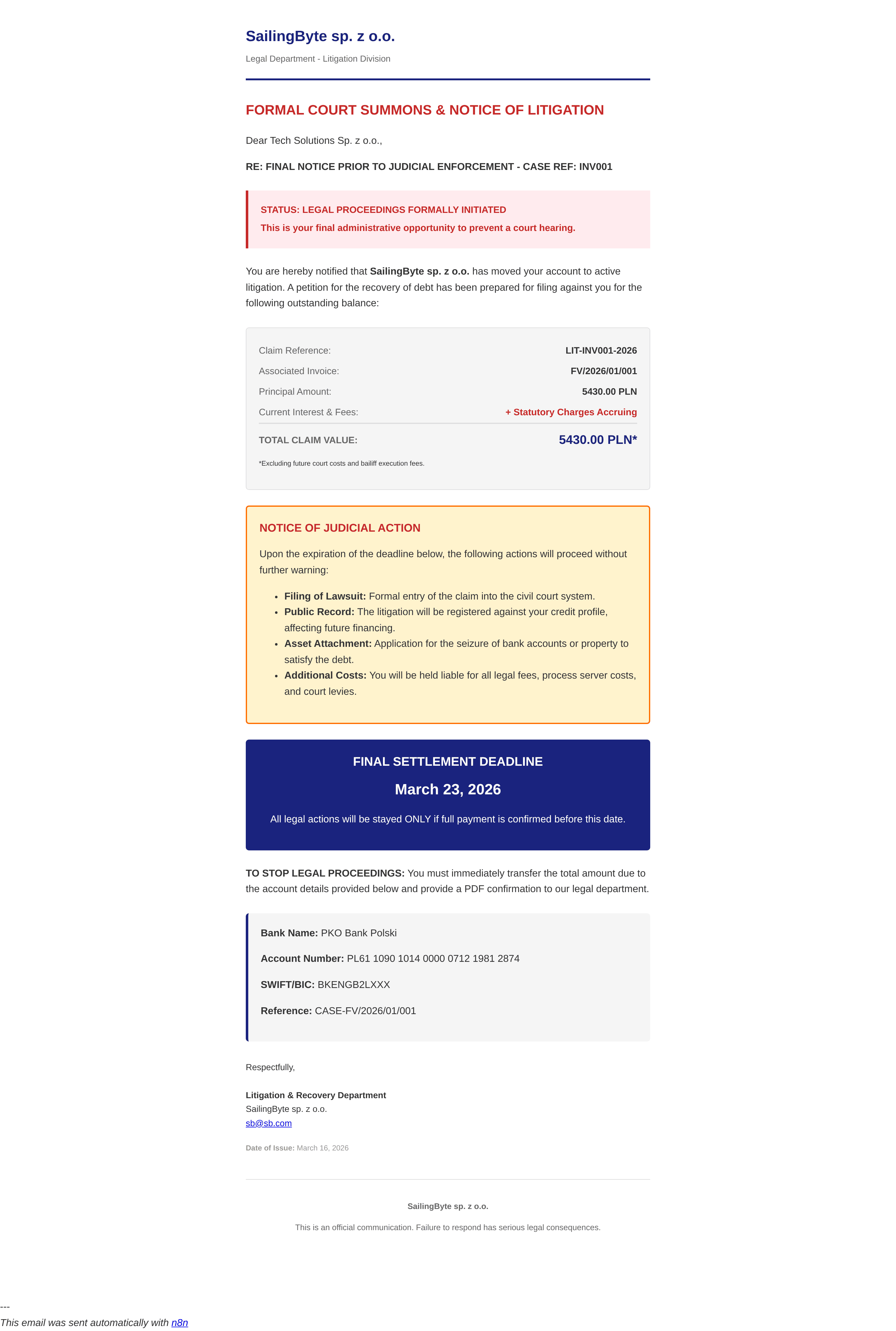
- Pre-Trial Summons: Y days after due date → Sends formal legal warning via email and optionally physical mail (PostGrid)
- Legal Action Notice: Z days after due date → Sends notice of commenced legal proceedings via email and optionally physical mail
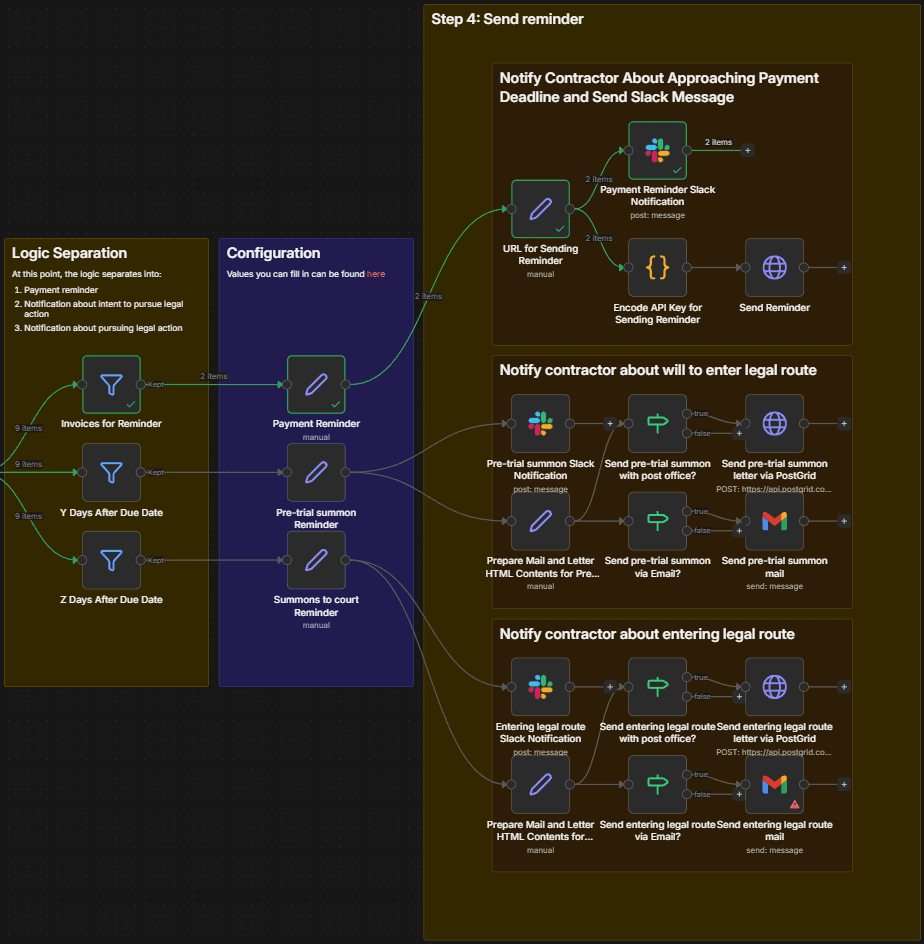
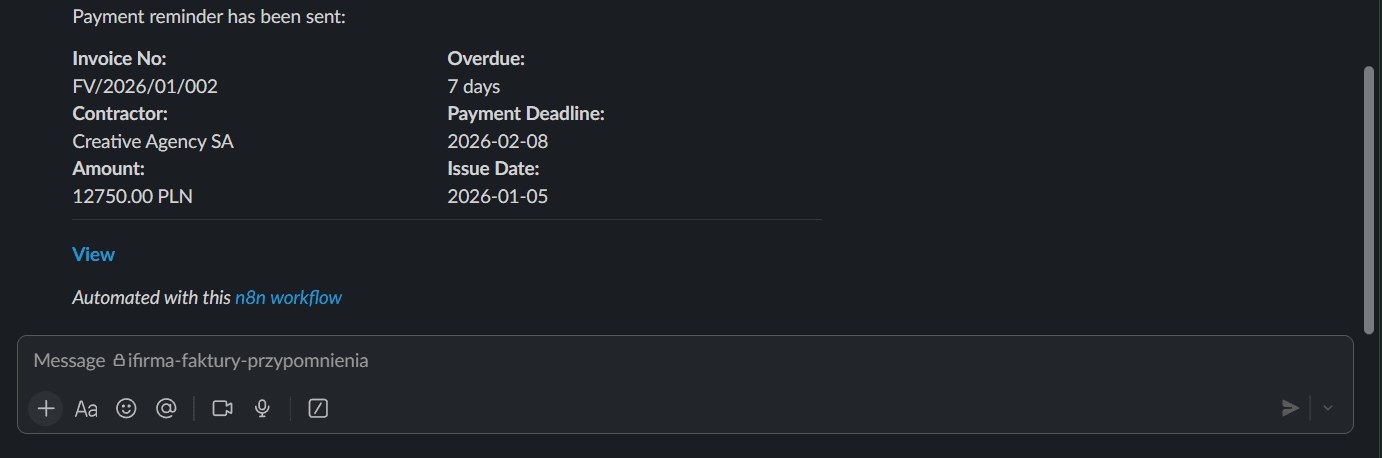
Each action triggers a Slack notification to keep your team informed.
How To Set It Up?
Prerequisites:
- An active N8N account or self-hosted instance
- An iFirma.pl account with API access enabled
- A Slack workspace with appropriate bot permissions
- (Optional) PostGrid account for physical mail delivery
- (Optional) Gmail account configured for sending emails
Required Configuration:
In the "Configuration" node, set the following parameters:
- Email/Login: Your iFirma.pl account email or login username
- API Key Invoice: API key from iFirma.pl (found at: Start > Data and Configuration > Extensions and Integrations > API)
- X days before due date: How many days before payment deadline to send the first reminder (default: 7)
- Y days after due date: When to send pre-trial summons (default: 7 days overdue)
- Z days after due date: When to send legal action notice (default: 14 days overdue)
Your Company Details Configuration:
In the "Your Company Details" node, provide:
- Company Name, Email, Phone
- Full address (Street, City, Postal Code, Country Code)
- Bank details (Bank Name, Account Number, SWIFT Code)
- Tax Identification Number (TIN/NIP)
This information is used for professional letterheads in legal correspondence and PostGrid physical mail delivery.
Credentials Setup:
- Configure Slack OAuth2 credentials for notifications
- Set up Gmail OAuth2 credentials for email sending (if using email route)
- Configure PostGrid API credentials for physical letter delivery (if using mail route)
Scheduling:
The workflow runs automatically every 24 hours via the Schedule Trigger node. For testing, execute manually using the "Execute workflow" button.
What's More?
Custom Authentication Implementation:
iFirma.pl requires HMAC-SHA1 authentication, which N8N doesn't provide natively. The workflow includes a complete JavaScript implementation of the SHA-1 cryptographic hash function and HMAC (Hash-based Message Authentication Code) algorithm. This ensures secure API access without external dependencies.
Endpoint Mapping Intelligence:
The workflow automatically maps invoice types (Rodzaj) to the correct iFirma API endpoints. Different invoice types (domestic, foreign, construction, advance payments, etc.) require different API paths for sending reminders.
Professional HTML Templates:
Pre-trial summons and legal action notices use professionally formatted HTML templates with proper legal language, payment details, deadlines, and consequences clearly outlined. These templates maintain consistent branding and meet legal communication standards.
Multi-Channel Notification:
Reminders can be sent via multiple channels simultaneously: iFirma's e-invoice system, email, physical mail (PostGrid), and internal Slack notifications for team awareness.
Understanding the HMAC-SHA1 Authentication
The "Encode API Key" nodes implement a critical security function that N8N cannot perform natively. Here's what happens and why:
What the iFirma API Requires:
iFirma.pl uses HMAC-SHA1 for request authentication. Each API request must include an Authentication header formatted as:
IAPIS user={userLogin}, hmac-sha1={hash}
The hash is calculated from: URL + userLogin + keyName + requestBody
Why Custom Implementation is Needed:
N8N's crypto functions don't include SHA-1 (it's considered outdated for modern security, though still required by some legacy APIs). Therefore, the workflow implements the entire SHA-1 and HMAC algorithms in pure JavaScript.
How the Algorithm Works:
- Message Construction: Combines the API endpoint URL, user login, key name ("faktura"), and request body (if any) into a single string
- Hex Key Conversion: The API key from iFirma is provided in hexadecimal format and must be converted to raw bytes
- HMAC Process:
- Creates inner and outer padding arrays using XOR operations with specific constants (0x36 and 0x5C)
- Hashes the inner padded message using SHA-1
- Hashes the outer padding combined with the inner hash result
- SHA-1 Implementation: Uses bitwise operations, rotating functions, and four rounds of 20 operations each to produce a 160-bit hash
- Header Generation: Formats the final hash as a hex string and constructs the authentication header
Why Each Step Matters:
- Deterministic Hashing: The same input always produces the same hash, allowing iFirma to verify request authenticity
- Binary Key Conversion: The hex-to-bytes conversion ensures the secret key is interpreted correctly
- HMAC Security: Using both inner and outer hashing with different padding prevents length extension attacks
- Message Integrity: Including the URL and request body in the hash ensures the request hasn't been tampered with
Thank You, Perfect!
Visit my profile for other free business automations. And if you're looking for dedicated software development or custom n8n workflow solutions, don't hesitate to reach out at [email protected] or on sailingbyte.com!